
Paid Traffic ROI
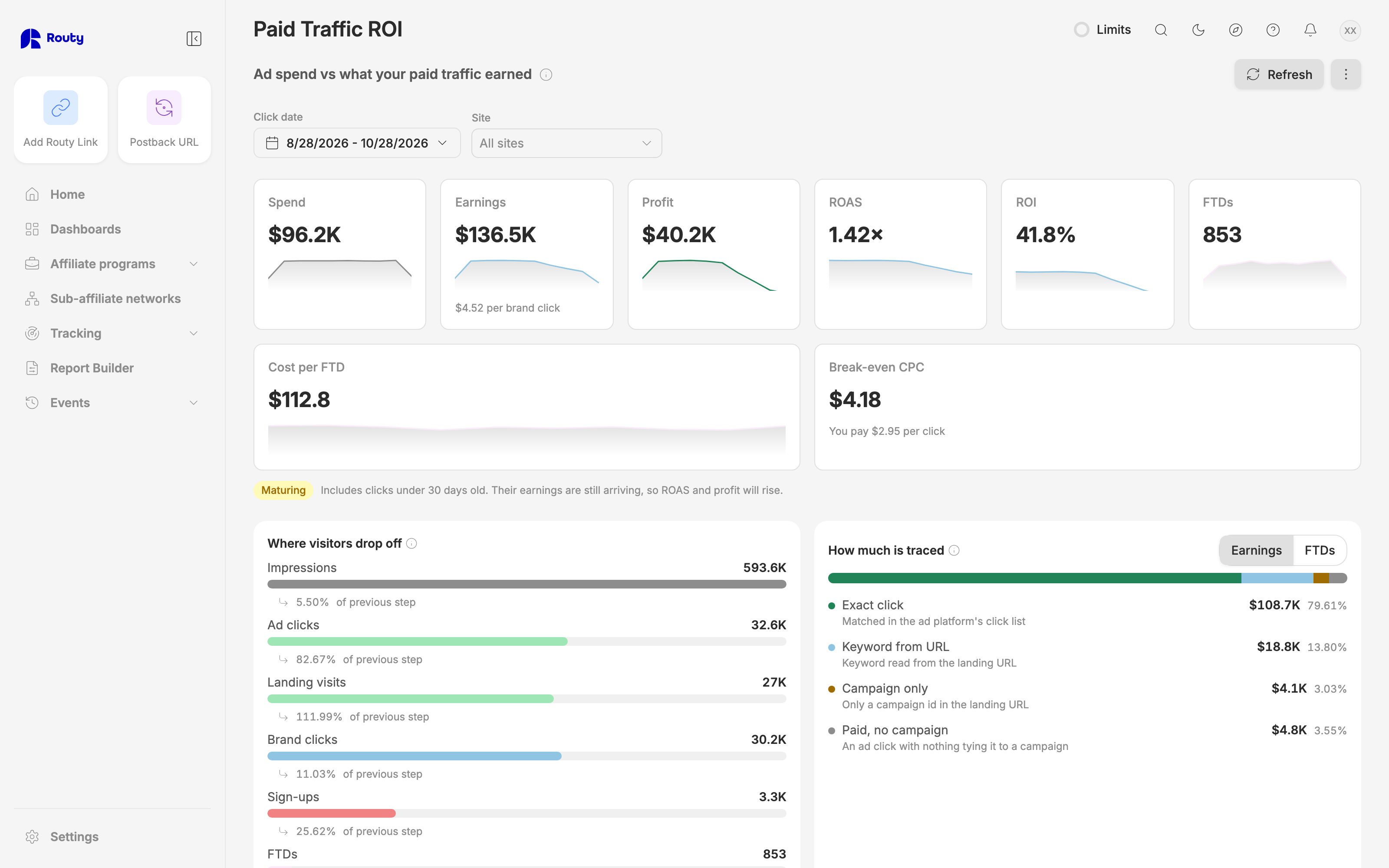
The Paid Traffic ROI dashboard answers one question: is the traffic I buy making money? It puts what your ads cost next to what that traffic earned at each brand, per site, campaign, ad group and keyword.
No other tool can show this. Your ad platform knows the keyword and the cost, but not which brand the visitor went to or what they earned. The brand knows the earnings, but not which keyword bought the visitor. Routy sees both sides of every click and joins them.
It covers paid traffic only: visits that arrived from an ad. Organic and direct visits are on the other dashboards.
Watch this video on its own page →
Transcript
Paid Traffic ROI answers one question: is the traffic you buy making money? It puts what your ads cost next to what that traffic earned, at every brand you send it to. Your ad platform sees the cost, and the brand sees the earnings. Routy is the only place that sees both. Profit is earnings minus spend. ROAS is earnings divided by spend, so anything above one times means every dollar came back with more. Break-even CPC is the most a click can cost before it starts losing money. Compare it with what you actually pay per click, written just underneath. Earnings keep arriving for weeks after a click, especially revshare. So when your dates include clicks under thirty days old, they're marked as maturing: their profit will still grow.
The funnel follows your traffic from impression to first deposit, and shows where you lose people. This bar shows how exactly each dollar was tied to your ads. Exact click means the ad platform's own click list named the keyword, so it's the most precise.
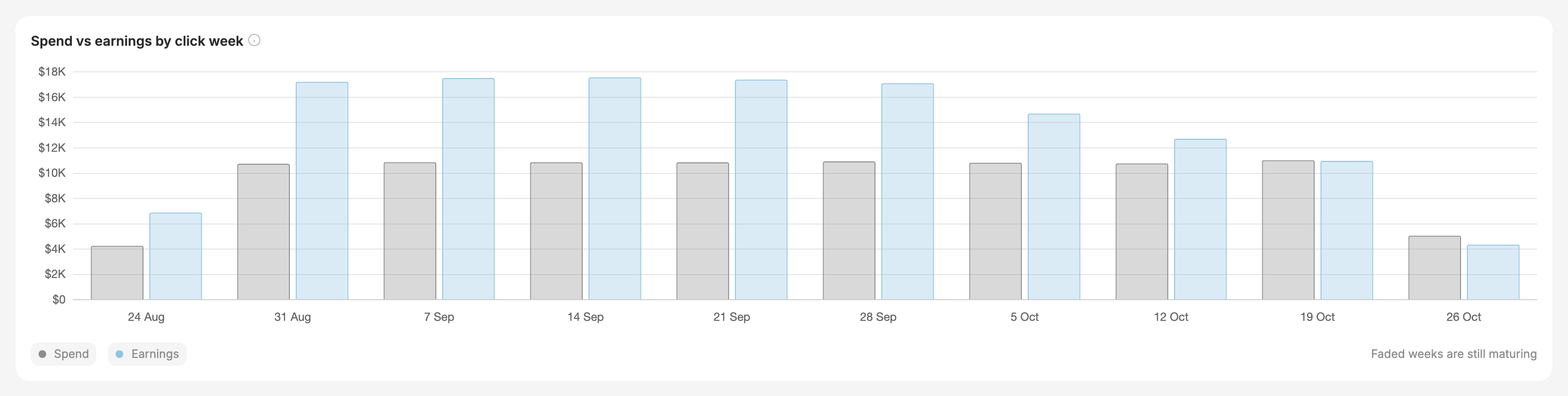
Week by week, spend and earnings sit side by side, grouped by the week of the click. The faded weeks on the right are still maturing, so judge them later.
Each of your sites gets its own profit and ROAS. Click one to narrow the whole dashboard to it.
Every campaign gets a verdict: profitable, losing money, or no earnings at all. Click a campaign to see its ad groups, then an ad group to see its keywords. Here, this broad-match keyword spends far more than it earns. Its break-even CPC is well below what each click actually costs, so every click loses money.
This grid is the view no other tool can draw: for each keyword, what each brand earns per click you send it. On this keyword, most clicks go to Lucky Spin, but Royal Flush earns almost three times as much per click. The best brand in each row is green, and n is how many clicks the figure rests on.
And the brands table flags any brand that took plenty of your traffic and paid nothing back.
Haven't connected your ad account yet? You still see earnings per keyword, read from your landing URLs. Spend, profit and ROAS appear once you connect the ad account under Tracking, then Channels.
This dashboard is rolling out account by account, so if you don't see it yet, ask your account manager. On your team, seeing it needs reports access, and connecting an ad account needs Channels access.
From the menu you can export the table or change the currency. For the full guide, open the help panel on this page.
Getting started
- Pick a Click date range. It opens on the last 30 days.
- Pick one or more Sites, or leave it on All sites for your whole paid program.
- Open Settings to choose the display Currency.
The web address updates as you filter, so you can copy it and send someone the exact view. Clear all resets the filters.
Account managers and admins also get an Affiliate filter. This report covers one affiliate at a time, so until an affiliate is picked here or in the header, the dashboard asks you to pick one.
What you need connected
- Spend comes from your ad account, connected under Tracking → Channels (Google Ads today, Microsoft Ads next).
- Earnings come from the conversions Routy already tracks for your brands.
Without an ad account you still see earnings per site, campaign and keyword whenever your ads' landing URLs carry the keyword. See When there is no ad spend.
Click date
Every number is dated by the day of the ad click, not the day the money arrived. That way a day's spend and the earnings from that day's clicks line up, and ROAS compares like with like.
Headline numbers
A ratio shows — when it can't be calculated, for example ROAS with no spend. It never shows 0 in its place.
The cards don't compare with the previous period on purpose: older clicks have had more time to earn, so the earlier period would always look better.
Why recent numbers rise
Earnings keep arriving for weeks after a click. Typically about three-quarters arrive within a week and most within 30 days, and revshare keeps adding for months.
So when your date range includes clicks under 30 days old, the cards carry a Maturing badge, and the weekly chart draws those weeks faded. Their ROAS and profit are a floor, not a final result. A recent week that looks like it lost money is often just early.
For the same reason, re-opening an old date range can show higher earnings than last time. That's expected.
Where visitors drop off
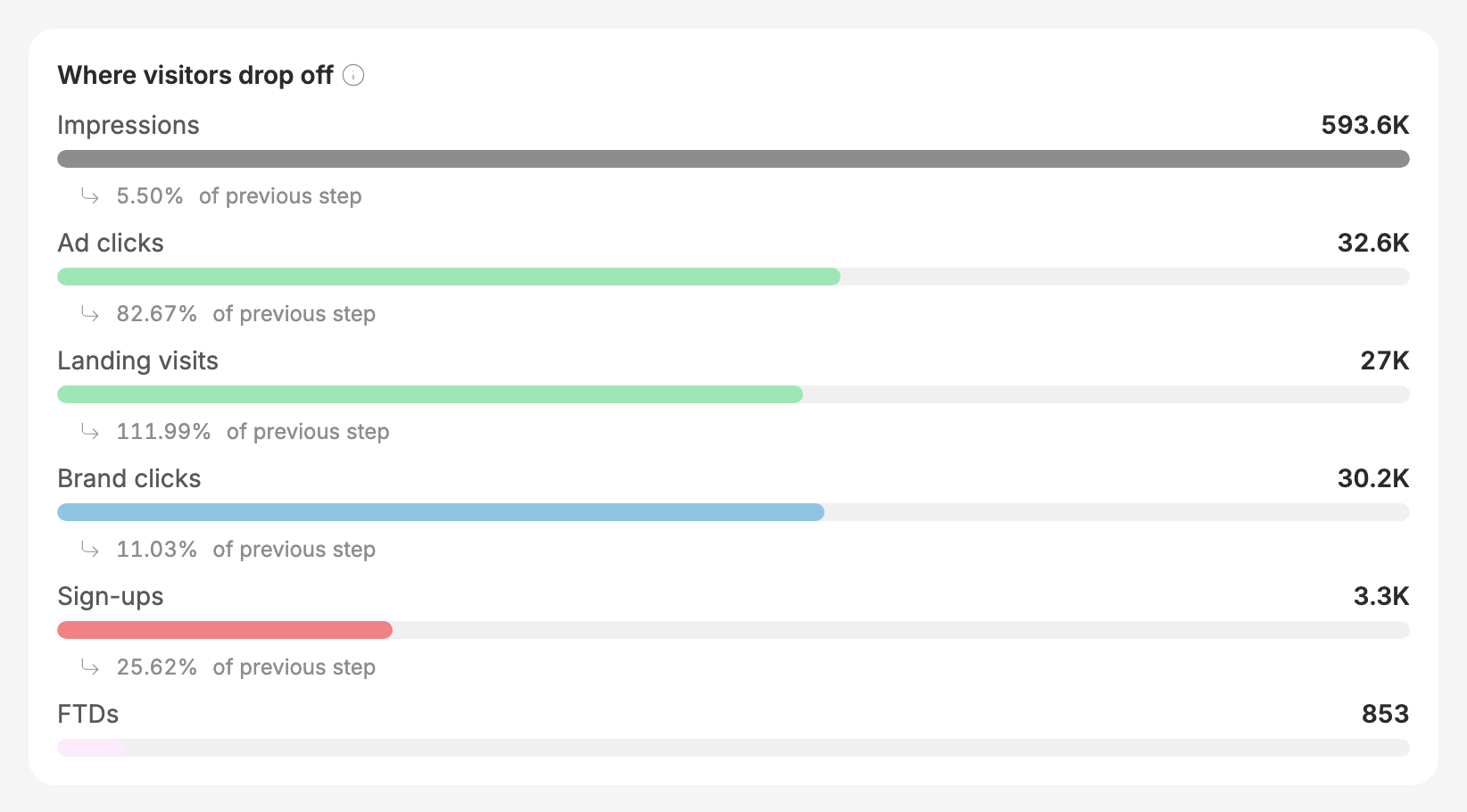
The funnel follows your traffic from Impressions → Ad clicks → Landing visits → Brand clicks → Sign-ups → FTDs, with the share that made it from each step to the next.
- Landing visits count each ad click once, on the site it reached first.
- Brand clicks can be more than landing visits, because one visitor can click through to several brands. That step can read over 100%.
- With no ad account connected, the funnel starts at landing visits.
How much is traced
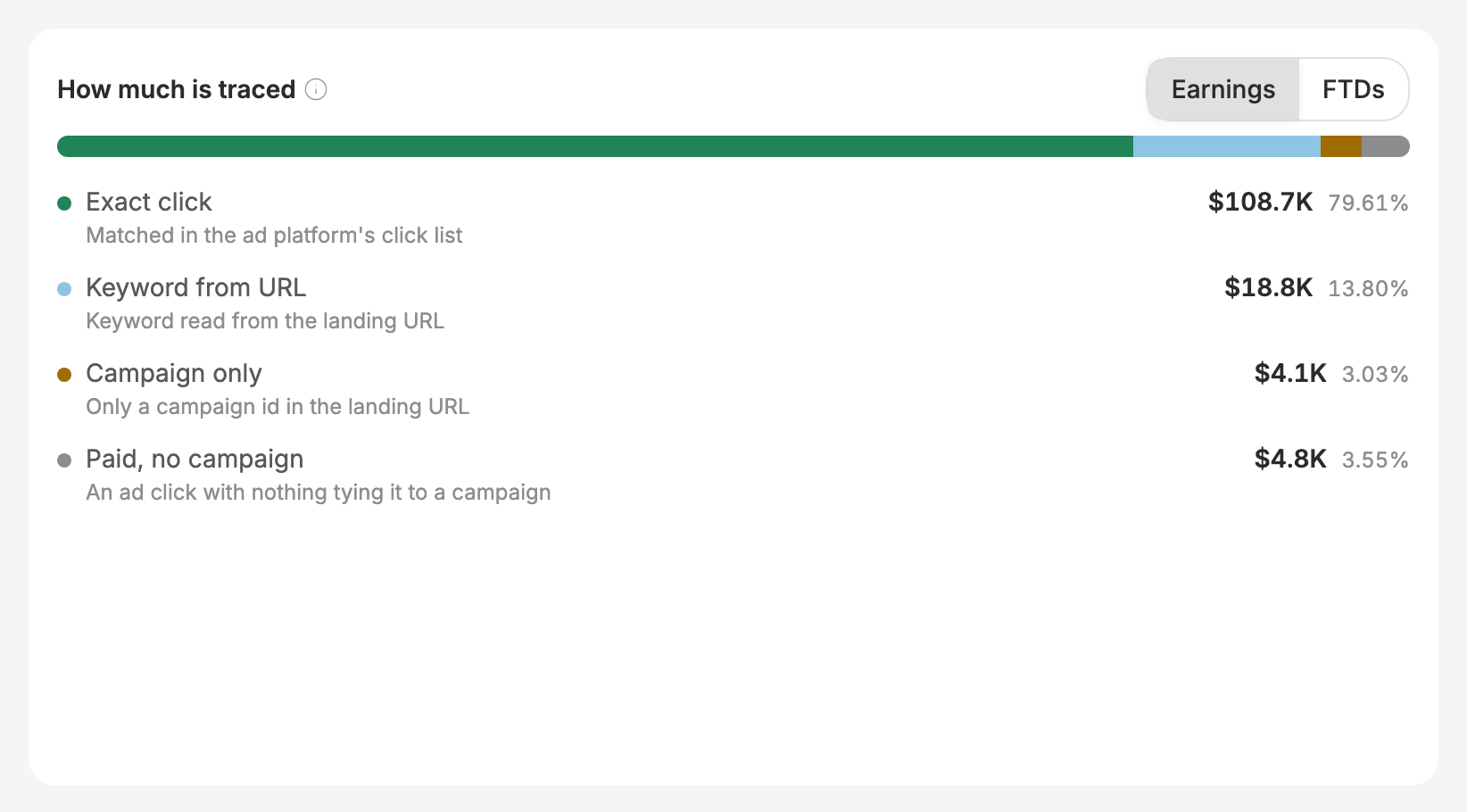
Each conversion is tied to your ads by the most exact method available, and this bar shows how much of your earnings (or FTDs) each method accounts for:
The bigger the Exact click share, the more closely these numbers will match your ad platform's. The ad platform keeps its click list for 90 days, so older clicks rely on the URL methods.
Spend vs earnings by click week
Spend and earnings side by side for each week of clicks. Hover a week for its ROAS. Faded weeks are still maturing.
Sites

Each site's paid traffic over the whole date range, with its profit, ROAS and cost per FTD. Click a site's name to narrow the whole dashboard to it; click it again to undo. A site you've picked also appears as a chip at the top.
No site is spend that couldn't be tied to a site because none of that campaign's clicks landed anywhere Routy tracks.
When one keyword sends visitors to several of your sites, its spend is shared between those sites in proportion to where its clicks landed. So spend per site is an estimate, while the total is exact.
Campaigns, ad groups and keywords
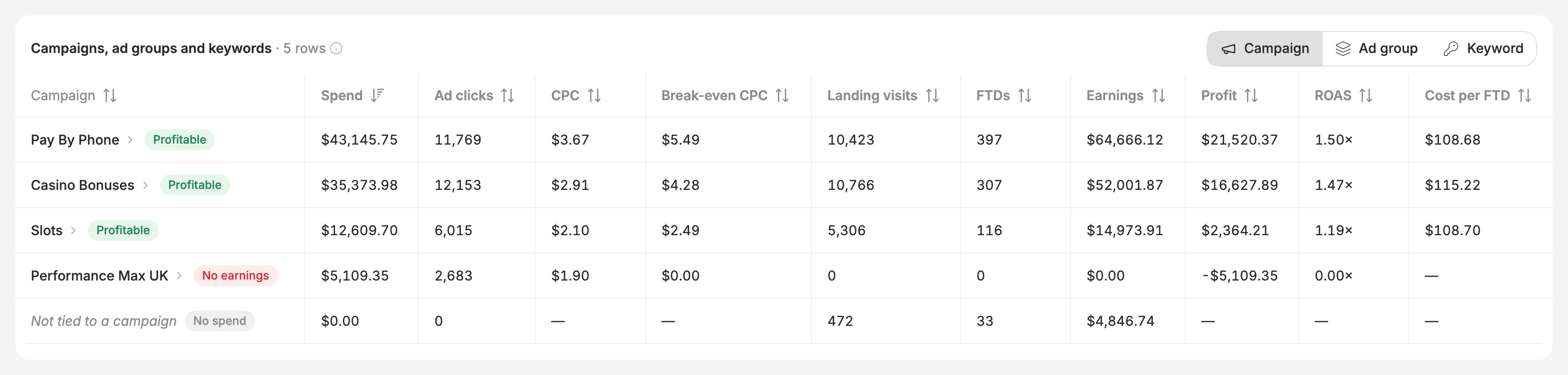
Switch between Campaign, Ad group and Keyword at the top of the table. Click a campaign to see its ad groups, and click an ad group to see its keywords. The rest of the dashboard follows: the funnel, the matrix and the brands all narrow to what you clicked. The chips at the top show where you are, and the × on each takes you back out.
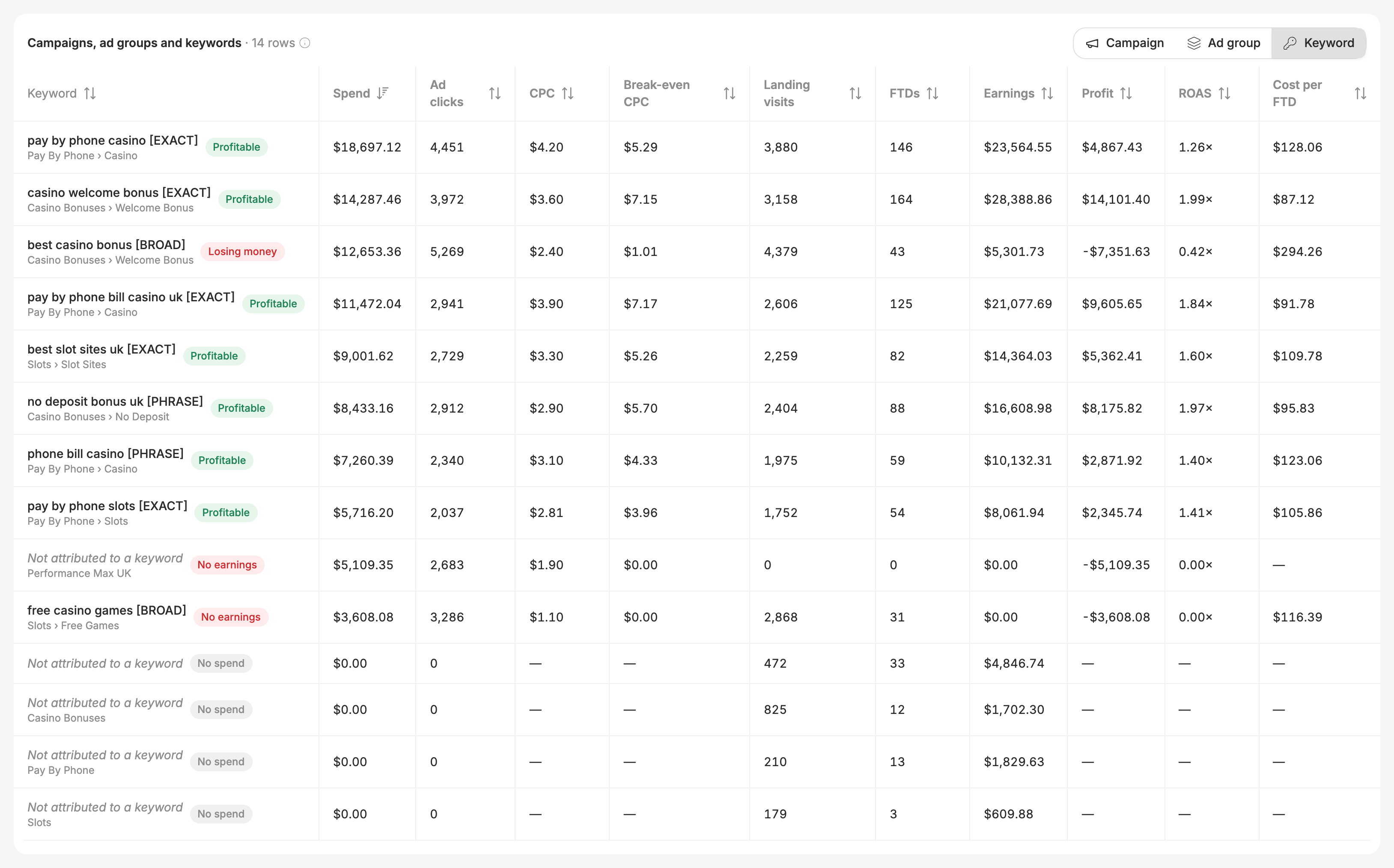
Each row carries a flag:
- Profitable: earnings are at least what it cost.
- Losing money: earnings are below spend.
- No earnings: it had at least 20 ad clicks and earned nothing.
- No spend: it earned, but there's no spend to set against it (usually no ad account connected).
Rows with too few clicks to judge get no flag.
Some rows are labelled Not attributed to a keyword or Not tied to a campaign. They're real spend or real visits that couldn't be placed lower: for example Performance Max spend, which Google doesn't report per keyword. They're shown so that each campaign's spend still matches your ad platform's total.
Export downloads the table at the level you're looking at, with every number and ratio.
Best brand per keyword
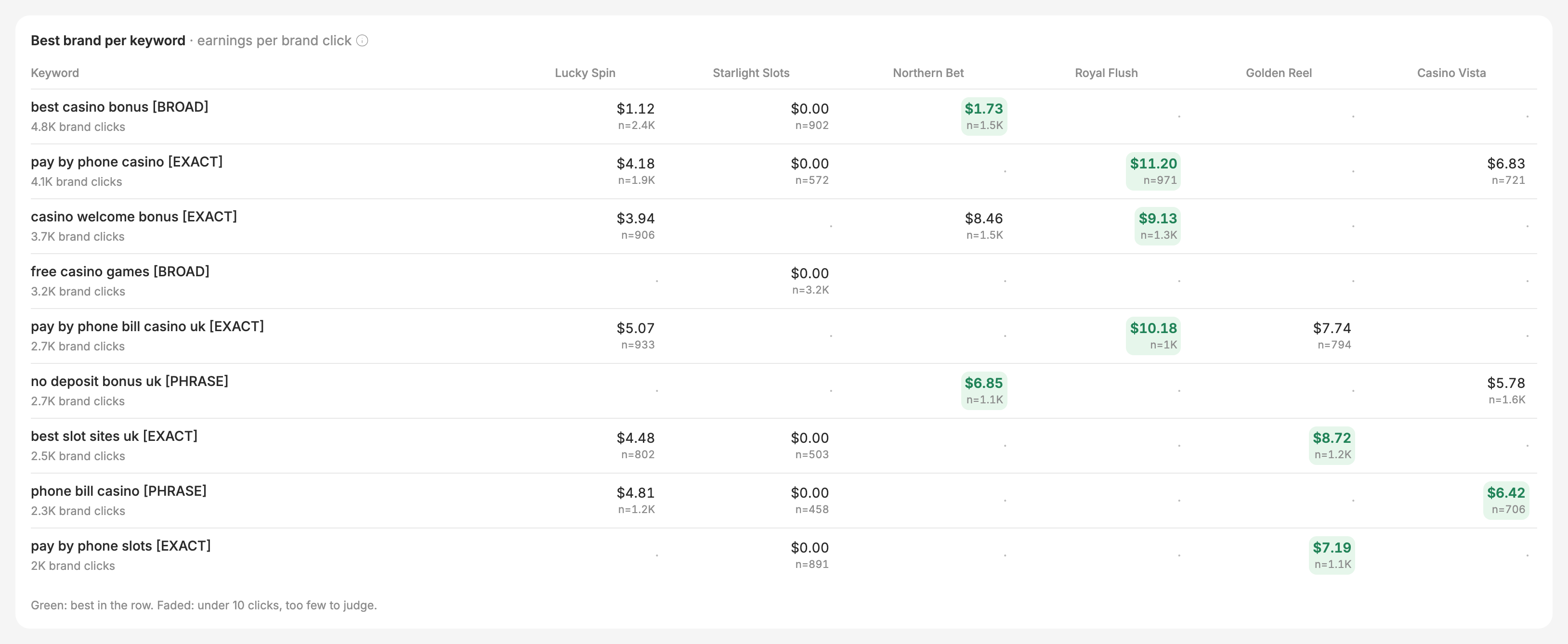
For your busiest keywords, this grid shows what each brand earned per click you sent it. Read across a row to see which brand to send that keyword's traffic to.
- The best brand in each row is highlighted green.
- n is the number of brand clicks behind the figure. Cells with fewer than 10 clicks are faded and can't be the best: a couple of lucky deposits isn't a pattern.
- The ranking changes from keyword to keyword. That's the point: the brand that wins on one keyword often loses on another.
There's no ROAS per brand, because your ad platform charges per keyword, not per brand. Earnings per click is the fair comparison.
Brands
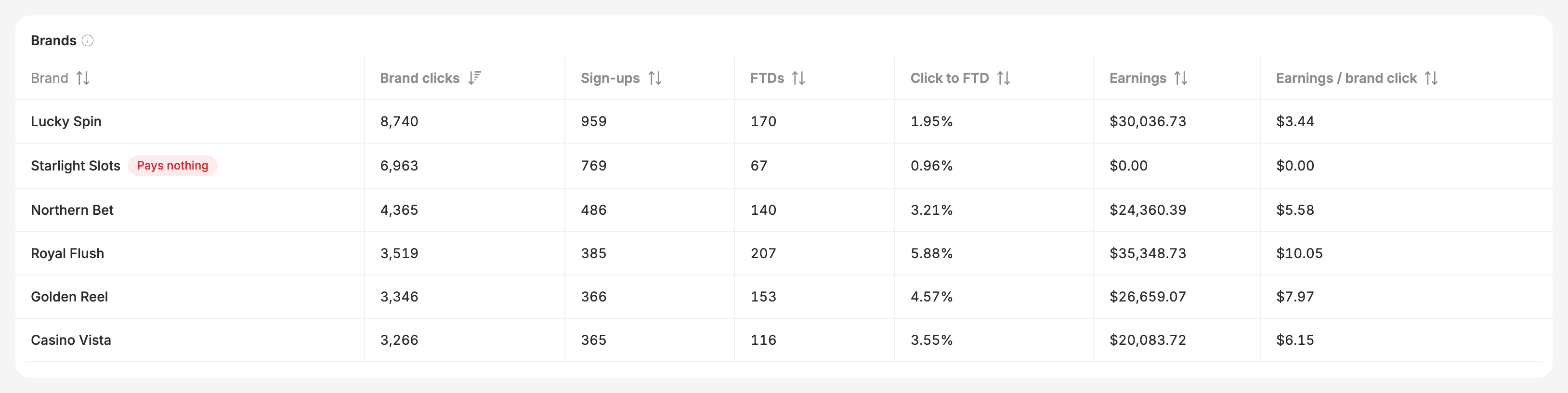
Every brand your paid traffic was sent to, with its clicks, sign-ups, FTDs, earnings and earnings per click. A Pays nothing flag marks brands that received at least 20 clicks and earned nothing.
When there is no ad spend
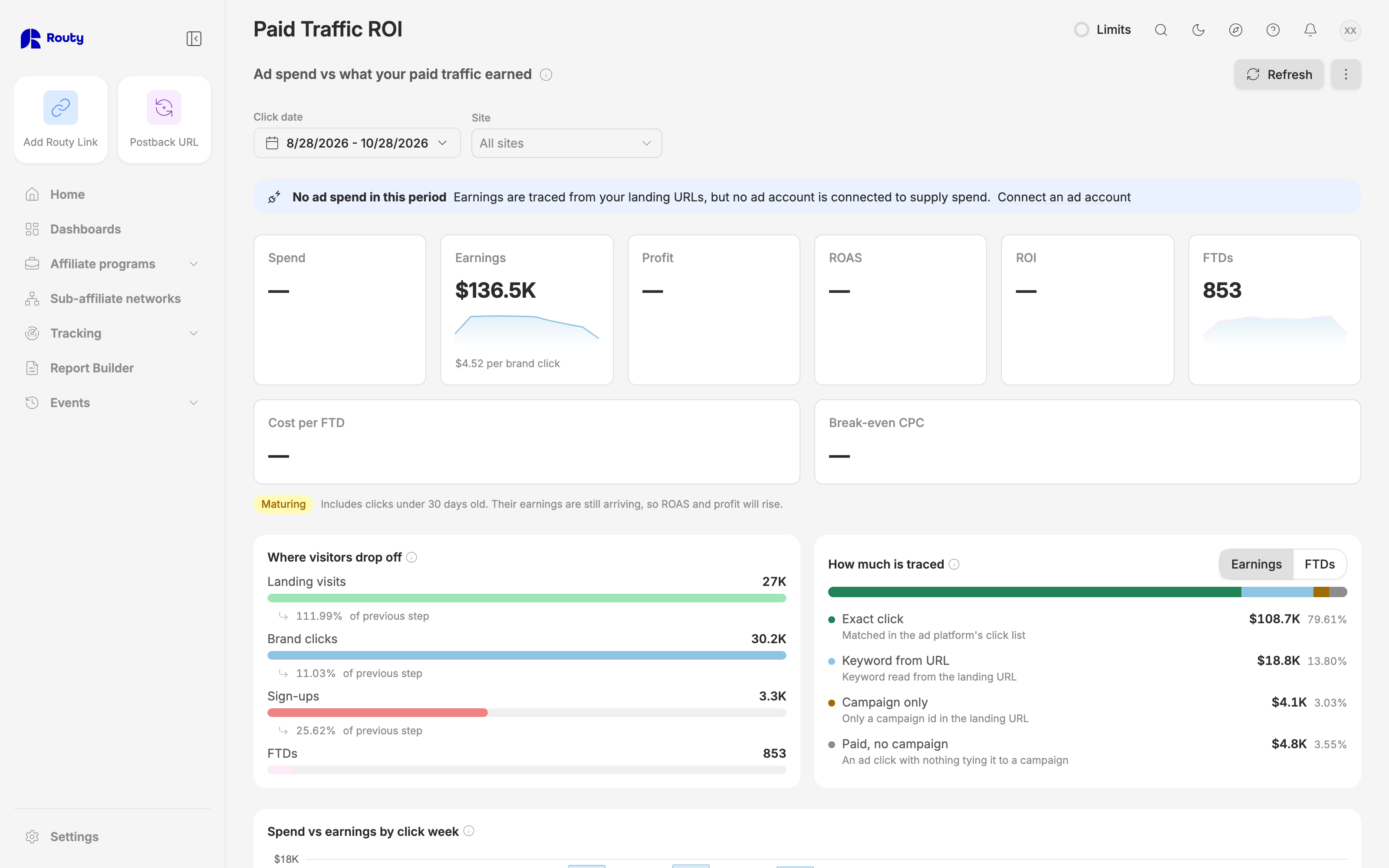
If you haven't connected your ad account, the dashboard shows No ad spend in this period. Earnings, the funnel from landing visits, keywords, sites and brands all still work, using the keyword in your landing URLs. Spend, profit, ROAS, ROI, cost per FTD and CPC show — until an ad account is connected.
To connect one, go to Tracking → Channels → Add.
Who can see it
The dashboard is rolling out account by account. If you don't see it, ask your account manager.
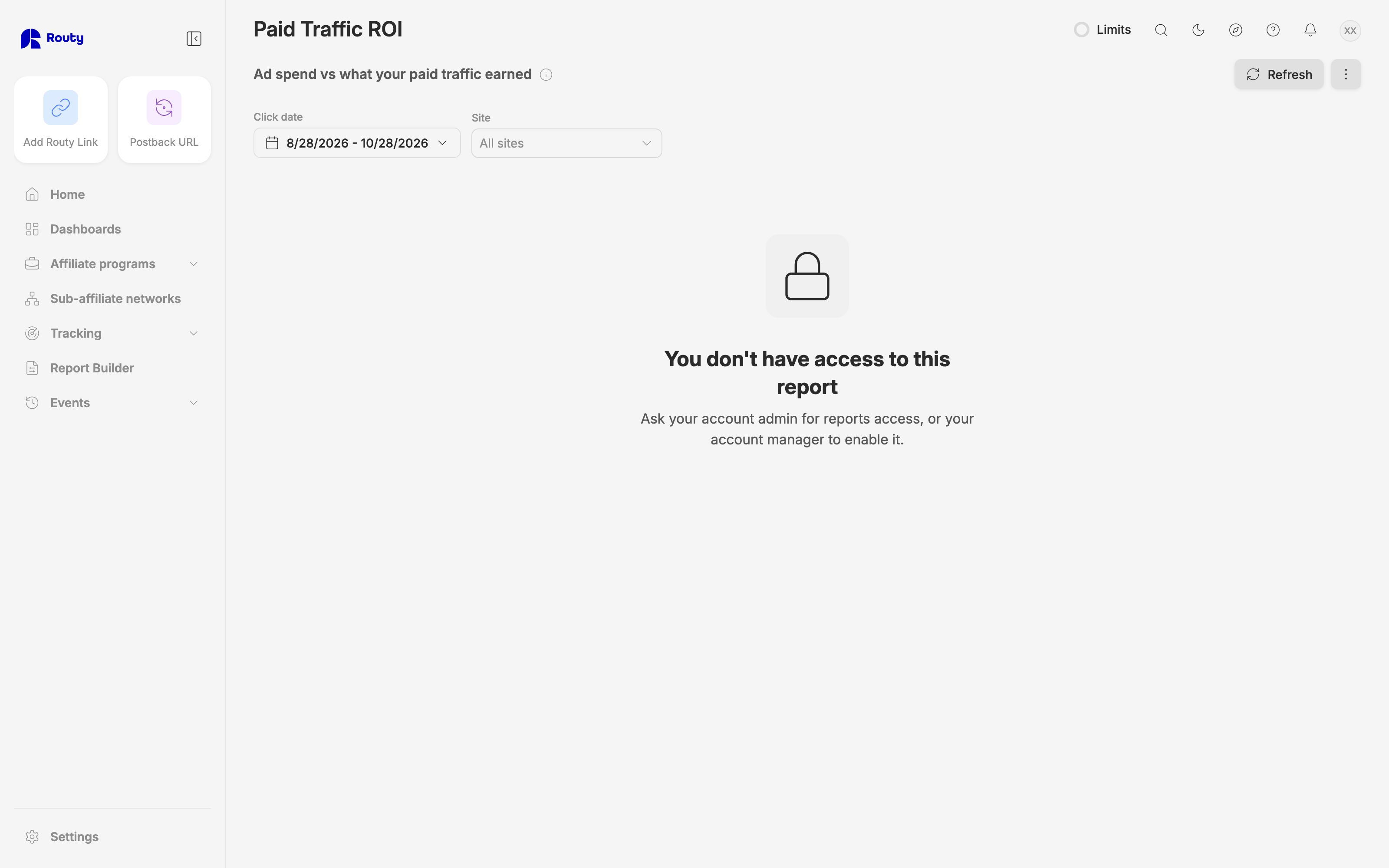
On your team, seeing it needs reports access, and connecting an ad account needs Channels access. Account admins have both. A team member without reports access sees this instead:
Troubleshooting
The dashboard is empty. Check the date range, and that the traffic really is paid: a landing URL needs an ad click id (such as Google's gclid) or a campaign or ad group id. Visits with only a utm_term don't count, because email and social use it too.
My spend doesn't match Google Ads. Check that the date range is the same and that you're on All sites: spend per site is shared out, so a single site won't match an ad-platform total. Spend is reported in your ad account's timezone.
My earnings don't match my other reports. This dashboard dates earnings by click, and other reports usually date them by when the conversion arrived. It also counts only paid traffic.
A keyword I know exists isn't listed. Keywords appear once they have spend or traced visits in the date range.
I'm an account manager and see "Pick an affiliate". Pick one in the Affiliate filter or the header.
When to escalate to engineering
- Total spend for a day differs from the ad platform's own total for that day by more than a cent, with All sites selected.
- An error appears instead of the dashboard, for an affiliate that has paid traffic.
- An attribution step appears in How much is traced under a raw name (like
some_new_step) instead of a readable label.