
Why this commission?
Routy estimates your commission from the account's commission plans. An account can have many plans, and Routy picks one per activity using rules: plans attached to the link or the tracking profile, region, country, brand, start dates, whether a plan is active, and the account default. Why this commission? shows which plan priced an activity, why every other plan on the account didn't, and how each amount was worked out. It changes nothing, so you can check as often as you like.
Where to open it
- An account's Raw Data tab (account page → Advanced → Raw Data). Every summary row (by day, month, tracker or dynamic variable) has a calculator button at its right edge.
- Events → Conversions. Every estimated commission (the rows marked Estimate) has a calculator button in its actions. On a phone it's the Why this commission? button on the conversion's card.
Click it on the row you're asking about. A panel opens, fills itself in from that row, and checks straight away. You need access to the account to use it.
Read the answer
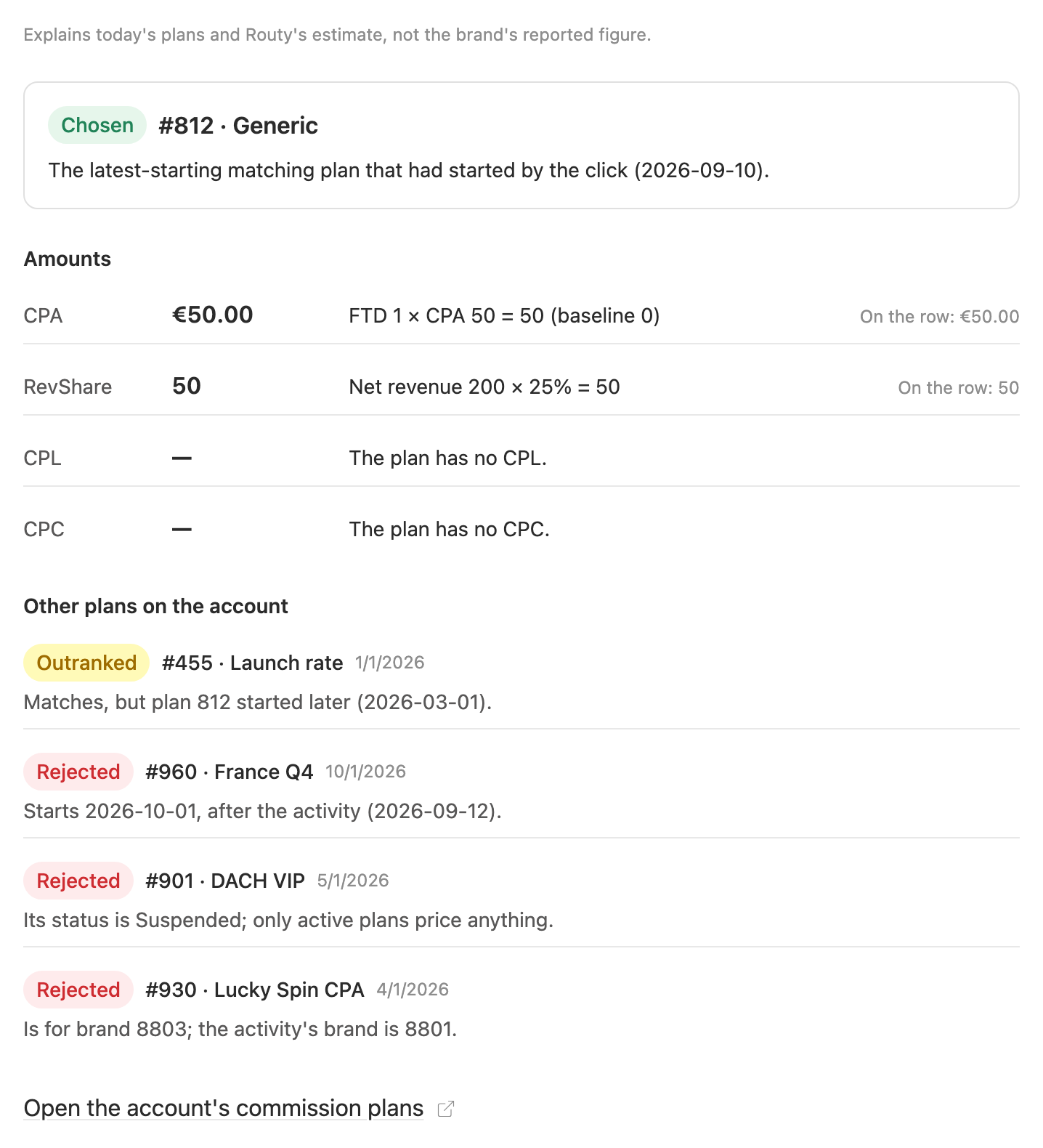
From the top:
- The chosen plan (green Chosen), with the rule that picked it. "The latest-starting matching plan that had started by the click (2026-09-10)" means no plan was attached to the link, and among the plans that fit this activity's brand and country, this one started most recently.
- Amounts, one line per commission type, each written out as a formula: "FTD 1 × CPA 50 = 50 (baseline 0)". A dash means the plan pays nothing of that type, and the text beside it says why ("The plan has no CPL", "Deposit 80 does not exceed baseline 100"). On the row is what the row you opened it from carries, so you can see at a glance whether they agree.
- Other plans on the account, every one of them, most likely runner-up
first:
- Outranked: it fits, but another plan wins. "Matches, but plan 812 started later" means both fit and the later start wins.
- Rejected: it can't price this activity at all, and the reason names the condition that failed (suspended, wrong brand, wrong country, not started yet).
CPA, CPL and CPC are in the plan's currency. RevShare is a percentage of the net revenue, so it's in whatever currency that was and is shown as a plain number.
The answer always uses the plans as they are now. If a plan was edited after the activity was priced, the stored figure can differ: the panel explains today's rules, not history. And it explains Routy's estimate, not the commission the brand reported.
How Routy picks a plan
The plans are tried in this order, and the first that applies wins:
- A plan attached to the link the click came through.
- A plan attached to that link's tracking profile.
- A plan attached to the activity's tracking profile.
- A region plan for the activity's region, the latest-starting one that had started by the click.
- A brand or country plan, the latest-starting one that had started by the click. If none had started by the click, the latest one that started before the activity still wins over the default.
- The account default.
Along the way:
- Only Active plans price anything. A Suspended or Not Active plan is rejected, even when it's attached to the link.
- A plan that started after the activity is never used.
- A plan for a specific brand only applies to that brand. A plan with no countries covers every country, and an activity with no known country only matches those.
What the panel checked
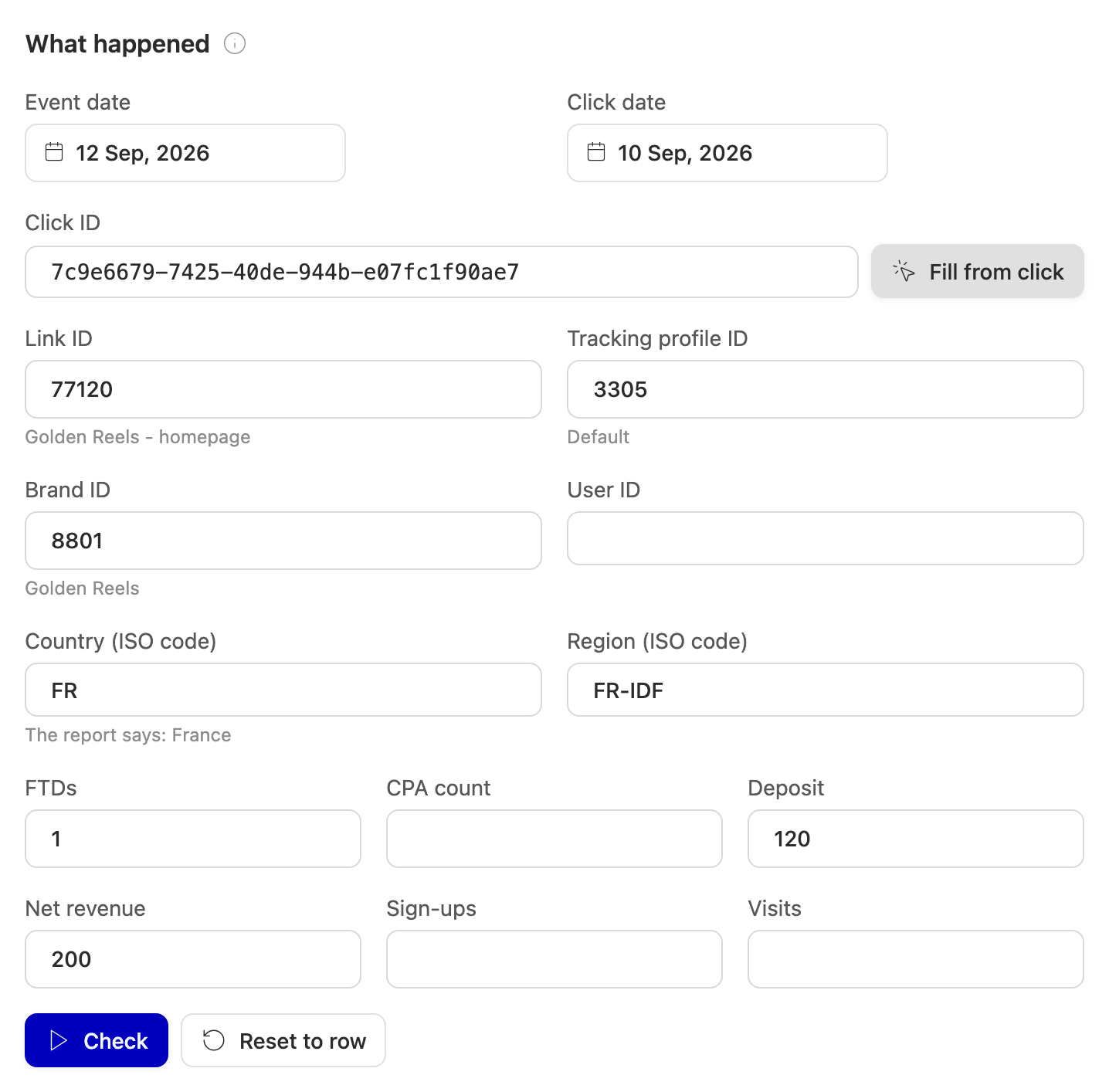
The panel works with IDs and ISO codes only.
- From a Raw Data row it fills the date, the brand, the country and region codes, the tracking profile, and the metrics (FTDs, deposit, net revenue, sign-ups, visits, CPA count). A row of the dynamic-variable summary also carries a click ID, and the panel looks that click up to fill the click date and the link. A summary row has no click date, so the row's date is used.
- From a conversion it fills the account, the conversion and click dates, the click ID, the link, the brand and the country and region. A conversion is a single event whose value is the commission, so it doesn't carry the FTDs or deposits the amount was worked out from. Fill those in to see the amounts; the chosen plan doesn't depend on them.
When the brand or country arrived as a name rather than an ID or code, The report says: France appears under the field. Type the code yourself; an empty country only matches plans that cover every country.
Ask "what if"
Every field can be changed. Change the country, a date, the brand or the FTDs and press Check again. Nothing is saved. Reset to row puts back what the row said and checks again. Fill from click looks up whatever click ID is in the field.
To fix what you found (suspend a plan, correct a start date, attach the right plan to the link), follow Open the account's commission plans at the bottom, then come back and press Check.
When no plan applies
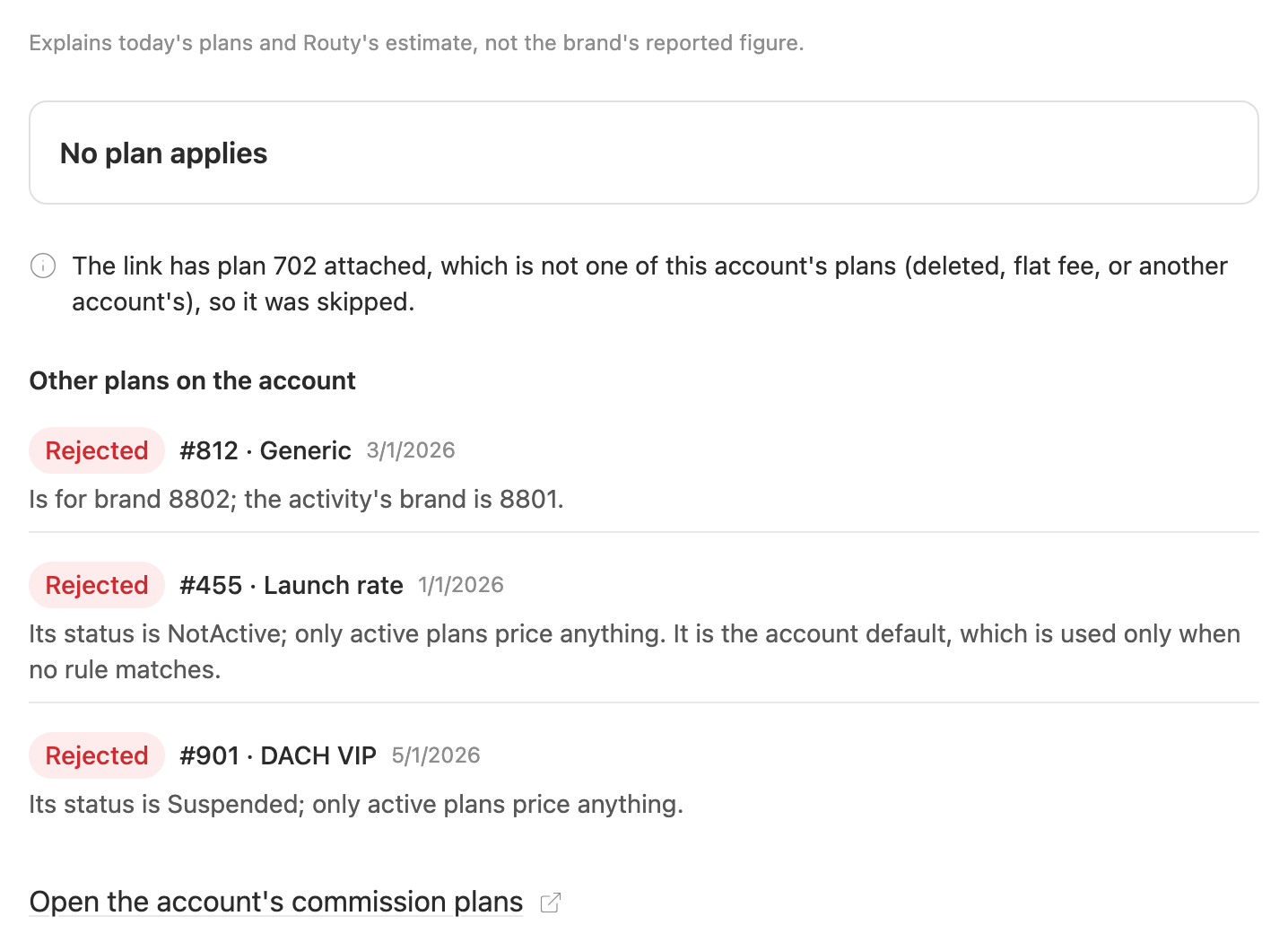
Nothing could price the activity, so it earns no estimated commission. Every plan is listed as Rejected with its reason. A note appears when something outside the plan list matters, for example a link that points at a plan which no longer exists.
Common questions
"On the row" is different from the amount.
- A plan changed since the row was priced. The panel uses the plans as they are now.
- The report carries the network's own commission. When a brand reports its CPA or RevShare commission, Routy keeps that figure and doesn't estimate it. The panel always estimates.
- The row is a summary. A Raw Data row by day, month or tracker adds up many players. A plan with a baseline is checked per player, so the panel can't apply it to a total. Open the row from the dynamic-variable summary, which is per click, or type a single player's figures.
- The report has a CPA count column that reads 0. Then the brand's CPA count decides CPA, not FTDs. A summary row can't tell that apart from a report with no CPA count column, so the panel leaves the CPA count empty and uses FTDs. Type 0 into CPA count to check it the other way.
- It's a conversion from a postback. A postback's estimate only ever includes CPA, and it treats baselines differently from report rows. The plan the panel picks is the right one; the amount follows the report-row rules.
The plan I expected is Rejected. Read its reason: it names the one condition that failed. Fix that on the plan and check again.
The plan I expected is Outranked. It fits, but something ranks above it: usually a plan attached to the link or tracking profile, or a plan that started later.
FTD-based CPA is a dash with "baseline". A plan with a baseline only pays CPA for an FTD when the deposit exceeds the baseline, and that can only be checked for one player: the activity needs a click ID or a user ID. A plan whose baseline isn't set pays no FTD-based CPA at all.
Check is greyed out. The panel needs an event date. Fill it in.
"Click not found." The click ID isn't one Routy recorded. Fill the link, brand and country yourself if you know them.
When to escalate
- The panel's chosen plan differs from what you see priced, no plan was edited since, and the report doesn't carry the network's own commission.
- A reason or a note contradicts what the account's commission plans page shows.
Include the account, the row's date or click ID, and a screenshot of the panel.