
Webhooks Event Log
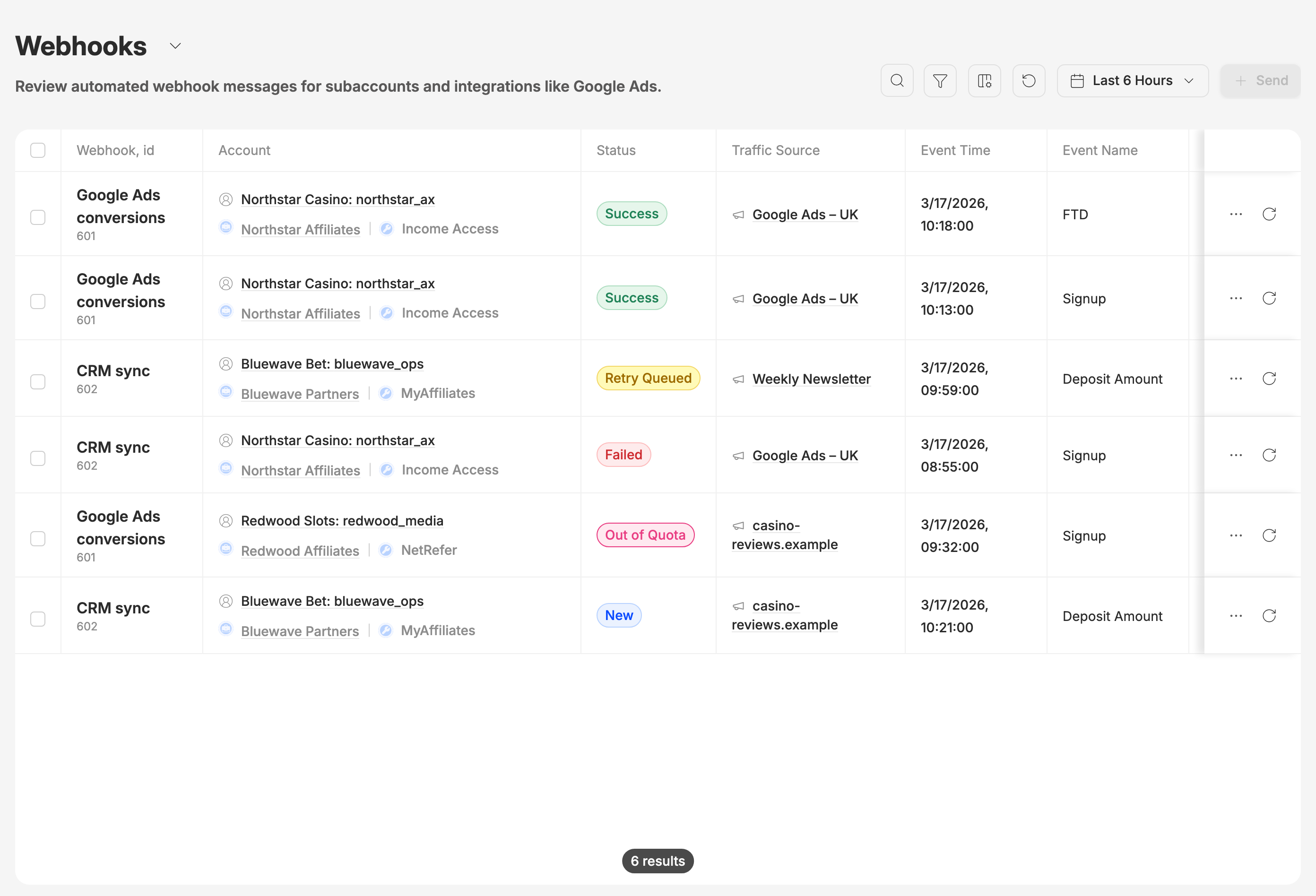
A walkthrough for Events → Webhooks. Every row is one webhook Routy sent because a conversion happened: a message to your traffic source, ad platform or your own system saying "this click converted". If someone asks "did the conversion get passed on?", "why did the ad platform not receive it?" or "what exactly did we send?", this is the screen that answers it.
This is not Settings → Event webhooks, which tells you about your account's own health. Webhooks are set up under Tracking → Webhooks; this page shows what they sent.
What this page is for
When a conversion arrives, Routy checks your webhook settings and sends a webhook for each one that applies. This page records every one of those sends: which webhook fired, for which conversion, whether it was delivered, and what the receiving end replied.
Use it to:
- Confirm a conversion was passed on to your traffic source or tool.
- See why a webhook failed, with the exact request and response.
- Send a webhook again after the receiving end is fixed.
Date
The date picker in the toolbar starts at the last 6 hours. The quick buttons go back as far as the last 6 months, and you can pick any range up to now, including the time of day. The range is based on when the webhook was created, not when the conversion happened.
Refresh reloads the list and, on a quick range such as "Last 6 Hours", moves it forward to now.
Status
For Failed, Retry Queued and Out of Quota, hover the status to see a one-line reason. Click the status to open the full details.
Reading the row
Empty cells show N/A. Show, hide and reorder columns from the columns button. Click a header to sort by it.
Delivery attempts
Click … at the end of a row, or click the status, to open the webhook. Its Outgoing Webhooks section lists every webhook sent for the same click, with the one you opened expanded. Open Delivery attempts on any of them to see, newest first:
- the Endpoint the webhook went to,
- what was Sent,
- the Response the receiving end gave, with its status code.
Each has a copy button, which is useful when you raise it with the receiving platform. The rest of the details show the click behind the conversion: its account, brand, traffic source and dynamic parameter, its conversions and incoming postbacks.
Resend
Use Resend Webhook (the ↻ on a row, or the button inside the details) to send a webhook again, for example after the receiving end has been fixed. Routy queues the same content to be sent again to the webhook's address. There's no confirmation step, and the list doesn't update by itself: click Refresh a little later to see the new attempt.
Resending needs account admin access. Without it you'll see "Failed to resend webhook".
Find webhooks for a conversion
The search box matches names: brand, account, program, webhook setting, traffic source, conversion type, country and region. Type at least 3 characters. It doesn't match a click ID or a dynamic parameter.
To find the webhooks sent for a particular click or conversion:
- Look the click up on Events → Clicks (search for its click ID or dynamic parameter, with a wide enough date range).
- Open the click and check its Outgoing Webhooks section.
Filters
Open Filter to narrow the list by Account, Brand, Status, Traffic Source or Event Name. Clear all resets them, and the filtered view is kept in the page address, so you can copy the URL and share it.
To see everything that needs attention, filter Status to Failed and Retry Queued.
Common questions
The ad platform says it never received a conversion. Find the conversion's webhook (see Find webhooks for a conversion), open Delivery attempts, and read the Response. A success response means the platform accepted it; an error response usually names what it didn't like.
There's no webhook for a conversion at all. Check under Tracking → Webhooks that a webhook setting covers that traffic source and conversion type.
I clicked a ClickId and the Clicks page is empty. The Clicks page opens on the last 6 hours. Widen its date range to when the click happened.
Many webhooks show Out of Quota. Your plan's webhook allowance was used up. Those webhooks weren't sent.
When to escalate
Contact support when:
- A conversion is covered by an active webhook setting but no webhook was created for it.
- A webhook shows Success but the receiving platform can show it never got the request.
- Resend reports success but the attempt count hasn't changed after a few minutes and a refresh.
Include the click ID, the webhook name or ID, and roughly when the conversion happened.