
Mapping rules
Every report you build groups by the same handful of things: brand, traffic source, country, region and commission plan. Those live on your tracking profiles — and when an integration discovers a few hundred new profiles, they arrive blank. Filling them in by hand is the job nobody finishes, and every report built on top of them is blind until somebody does.
Mapping rules do it for you, by reading the name you already gave the profile.
If FB_BTM_DE means Facebook / BetMGM / Germany to you, a rule can make it mean
that to Routy too.
You'll find them in Settings → Mapping rules. The work goes in this order: build a rule, preview what it would do, then Apply it. Every apply can be undone from History. Once you trust a rule, you can let it fill in new profiles automatically as your integrations discover them.
Nothing is written to a profile until you apply a rule or switch one to automatic.
Watch this video on its own page →
Transcript
In this video, we'll fill in tracking profiles with mapping rules. A rule reads the brand, traffic source and country out of a profile's own name. You'll find them in Settings, under Mapping rules. Rules are grouped by what they cover, narrowest first. For the same detail, a narrower rule always wins. Open a rule to see what it does. This one covers every account on the Northlight program.
It splits the name into three parts: traffic source, brand and country. So a profile named F B, B T M, D E becomes Facebook, BetMGM, Germany.
Preview shows what the rule would change, without touching anything. Coverage leads: how many profiles have a brand now, and how many would after. When it looks right, click Apply. It fills in empty details, and never replaces a value you set by hand.
This rule also has Apply to new profiles automatically switched on. New profiles your integrations find are filled in, without anyone pressing Apply. It only fills empty details, and it doesn't go back over profiles you already have.
Every run is listed under History, newest first, including the one we just applied. Runs a rule started on its own are marked Automatic.
Details shows every value a run wrote, and what was there before. Undo puts those values back, unless they've been changed since. A run can be undone once. On an account's Tracking profiles tab, the Mapping rules menu opens the rules for that account. The help panel on this screen explains the rest.
From an account
On an account's Tracking profiles tab, the Mapping rules button opens a short menu:
- Rules for this account opens Settings → Mapping rules showing only the rules that reach that account, including wider rules that cover it. History shows only that account's runs. Clear the account chip to see everything again.
- New rule for this account opens the rule builder right there, already set to cover just that account. If you apply it, the list of profiles refreshes.
Your rules
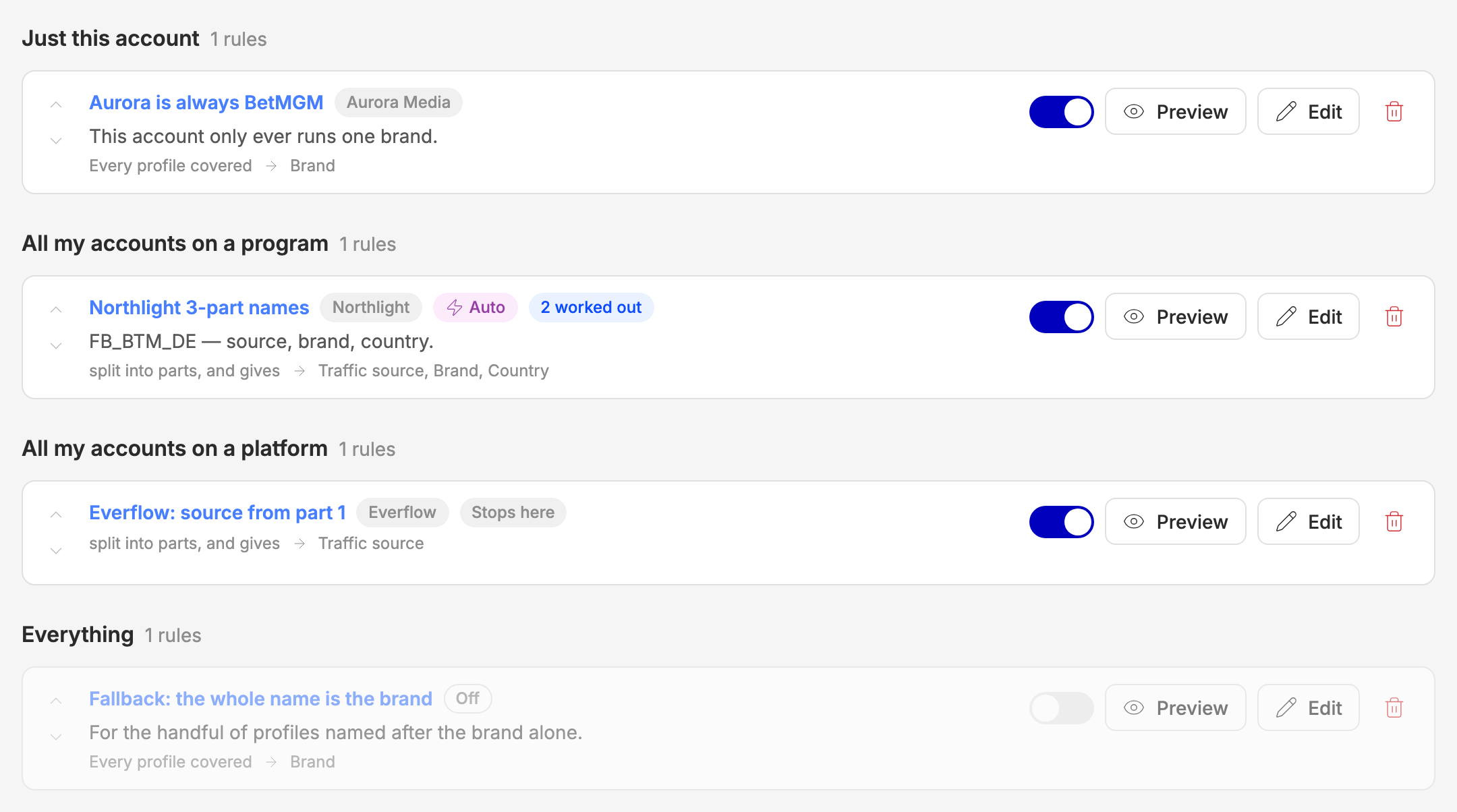
Rules are grouped by what they cover, narrowest group first. That grouping is the precedence order: for any field, a rule about one account beats a rule about a program, which beats a rule about a platform, which beats a rule about everything. The up and down arrows reorder rules inside one group only — they can never lift a rule above a narrower one.
Each row also carries its own switch. Turning a rule off leaves it in the list and skips it; it is not deleted. Off and Stops here appear as labels on the row, Auto marks a rule that fills in new profiles on its own (see Apply to new profiles automatically), and worked out counts values Routy filled in for you (see What the values mean).
Suggest a rule
Start here. Instead of a blank form, we read your own profile names and come back with a draft.
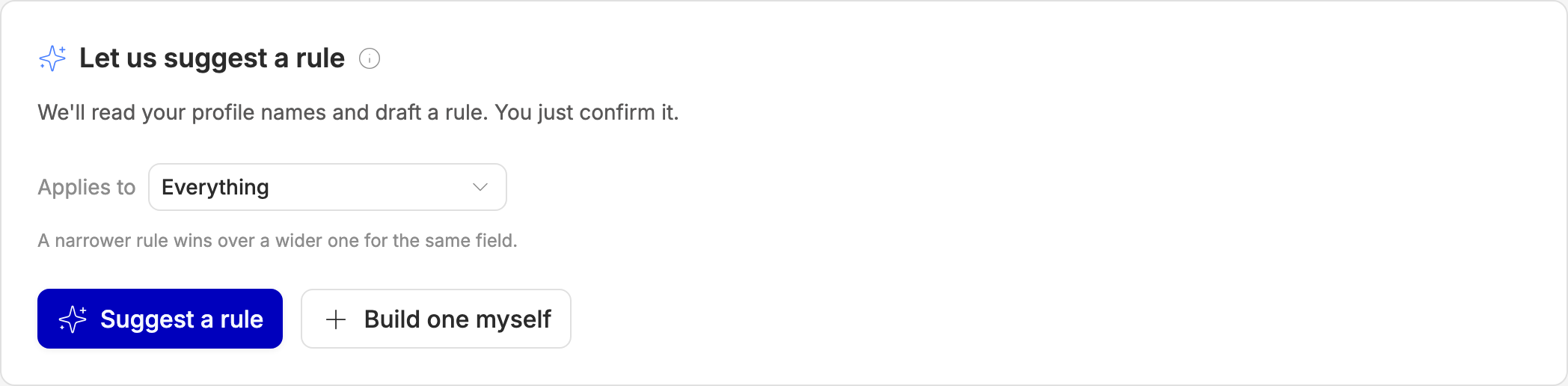
We look at up to 5,000 of your profiles, try the common separators (_, -,
|, ., space), take the shape most of your names share, and then test each
position against the things it could actually be — your brands, your
traffic sources, and the country and region
lists. A position is only claimed when we can explain at least half of the
distinct values in it.
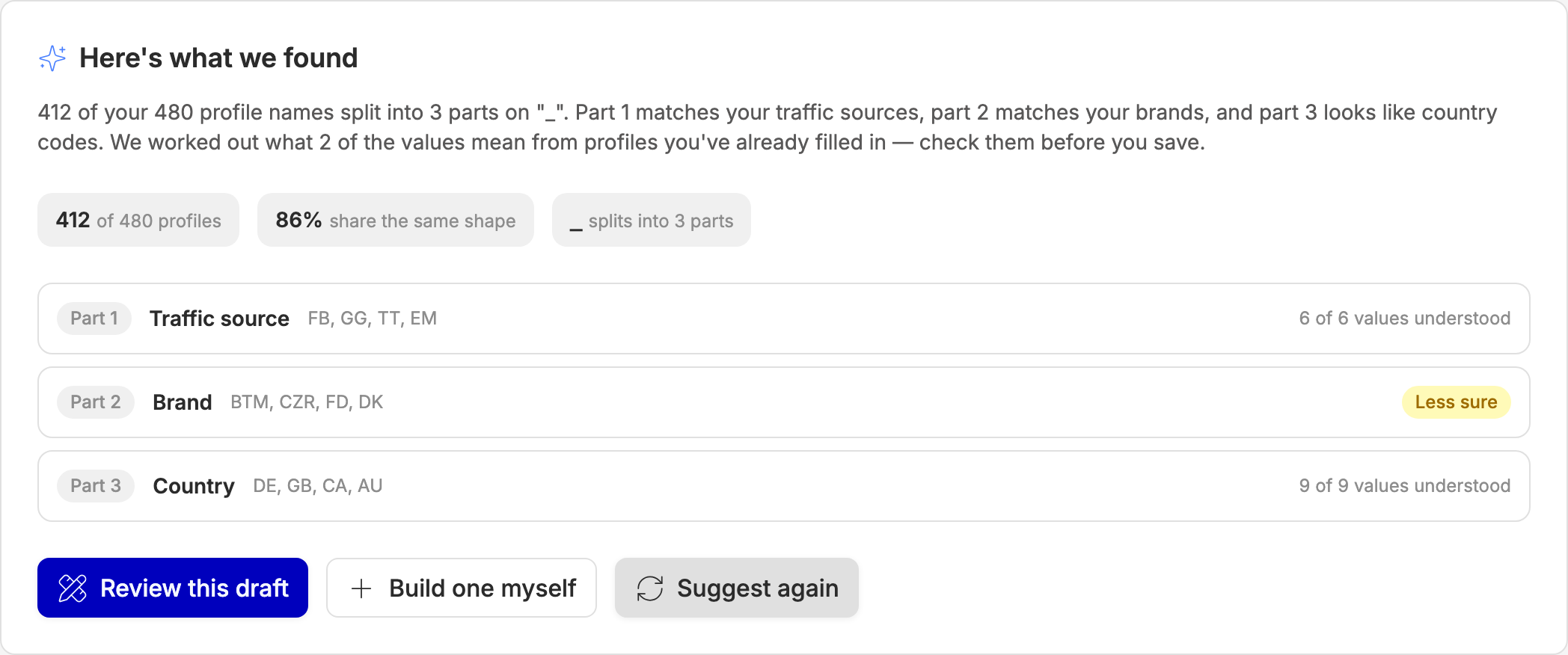
Your job is to check it, not to write it. Less sure marks a part where a lot of the values didn't resolve — that's the one to look at first. Open Review this draft and the builder opens pre-filled. A suggested rule always arrives switched off, so nothing is live until you say so.
If your names have no pattern we can use, we'll say so plainly and you can build a rule by hand instead.
Which profiles
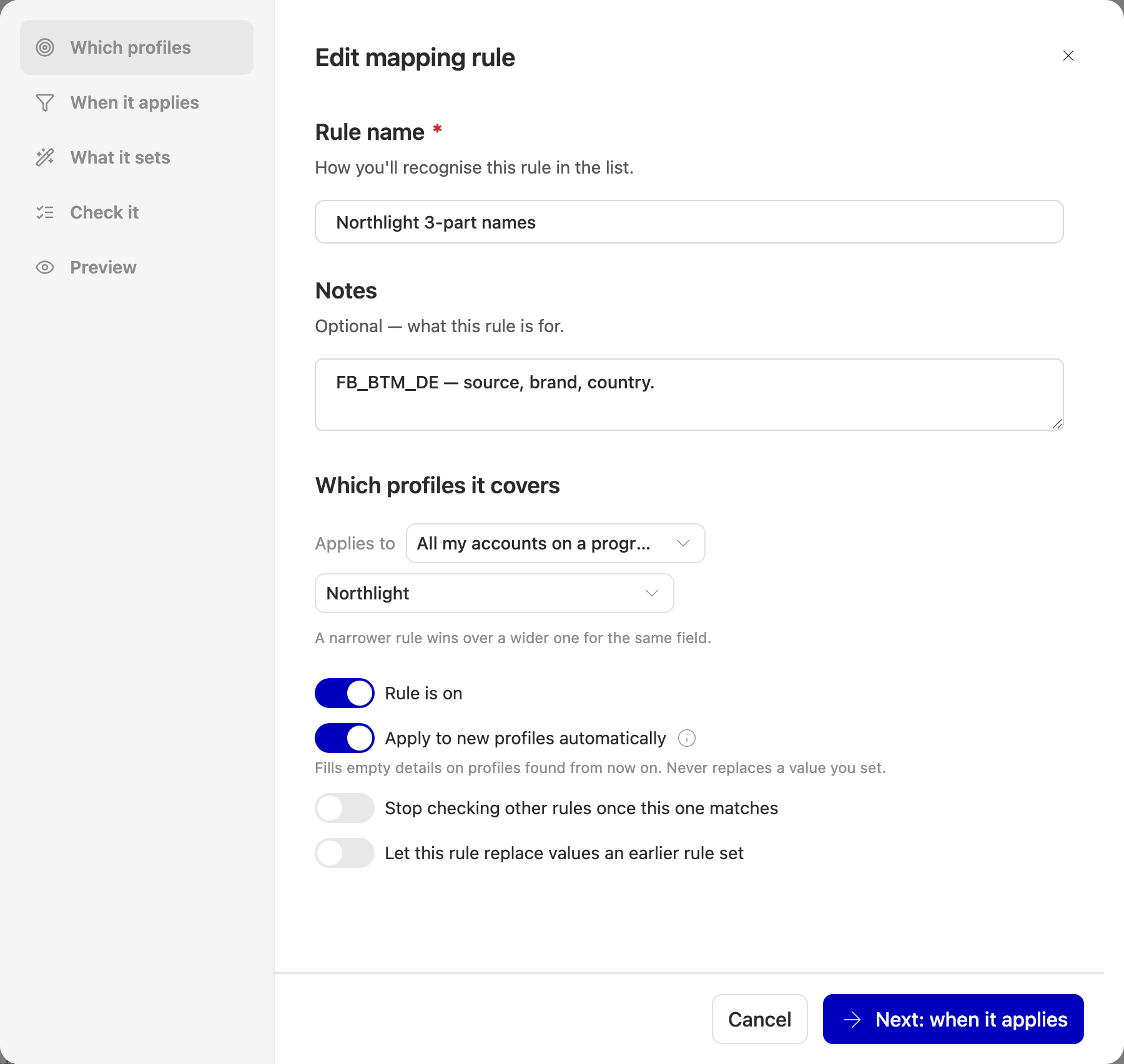
A rule covers one of four things:
This is almost always the answer to "why isn't my rule doing anything?" — a narrower rule already set that field. The Why? column in the preview names the rule that got there first.
Apply to new profiles automatically is also on this step. It has its own section below.
Two more switches on this step change how a rule interacts with the others:
- Stop checking other rules once this one matches — nothing after it is considered for that profile. Note it triggers when the rule's conditions match, even if the rule then fails to work out a value.
- Let this rule replace values an earlier rule set — lets a wider rule take a field a narrower one already claimed. It never touches a value a person entered by hand.
When it applies
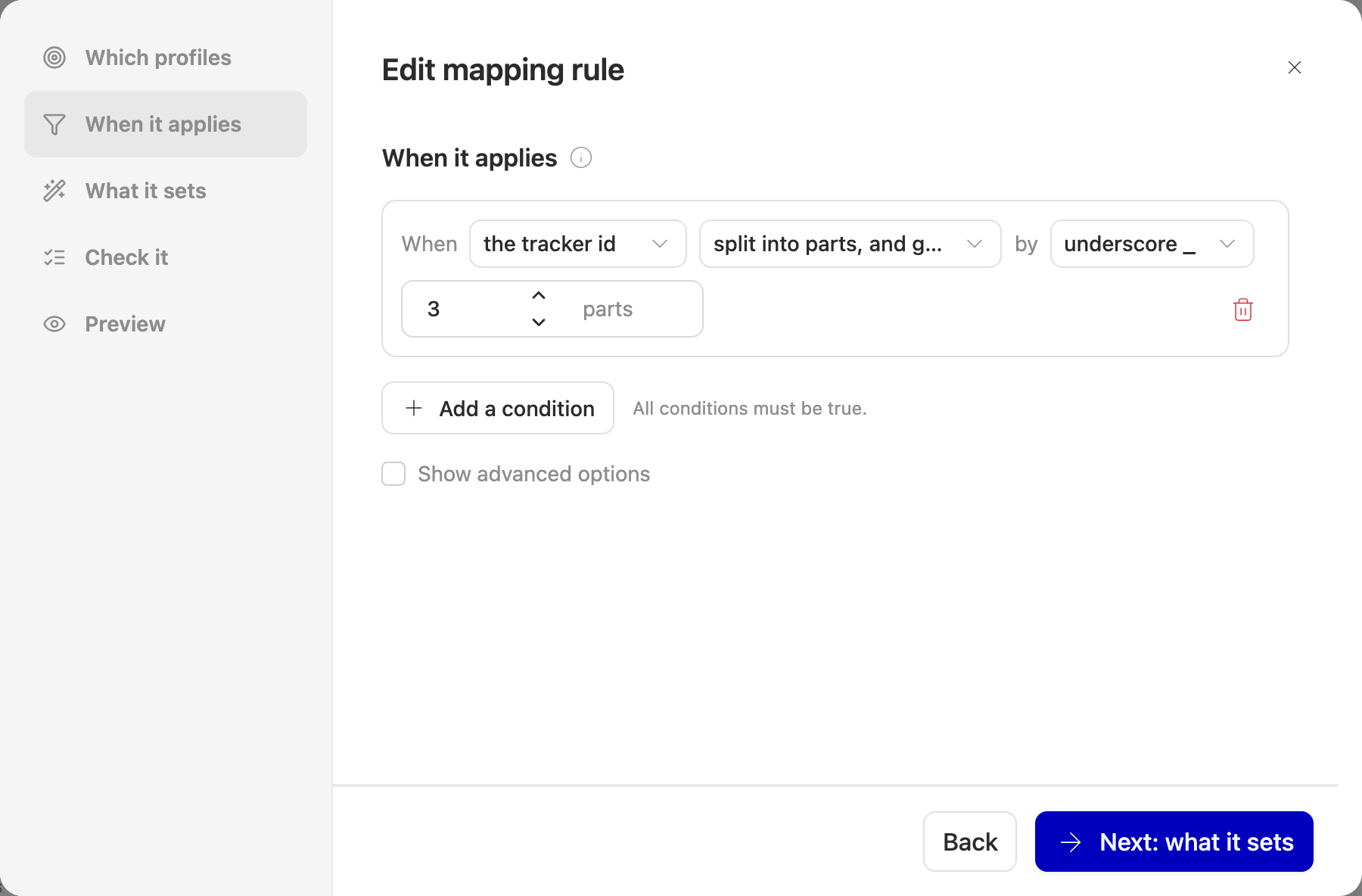
Conditions are built from dropdowns and read like a sentence: the tracker id · split into parts by "_" · gives 3 parts.
All conditions have to be true — there's no "or". If you need an either/or, make it two rules.
A rule with no conditions at all applies to every profile it covers. That's perfectly reasonable for a single account ("everything here is brand X"), and usually a mistake anywhere wider.
If you're comfortable with regular expressions, tick Show advanced options to unlock pattern matching and named groups. You never have to — every other operator is enough on its own. A pattern that is invalid, or that takes too long to evaluate, causes the rule to be skipped rather than failing anything.
What it sets
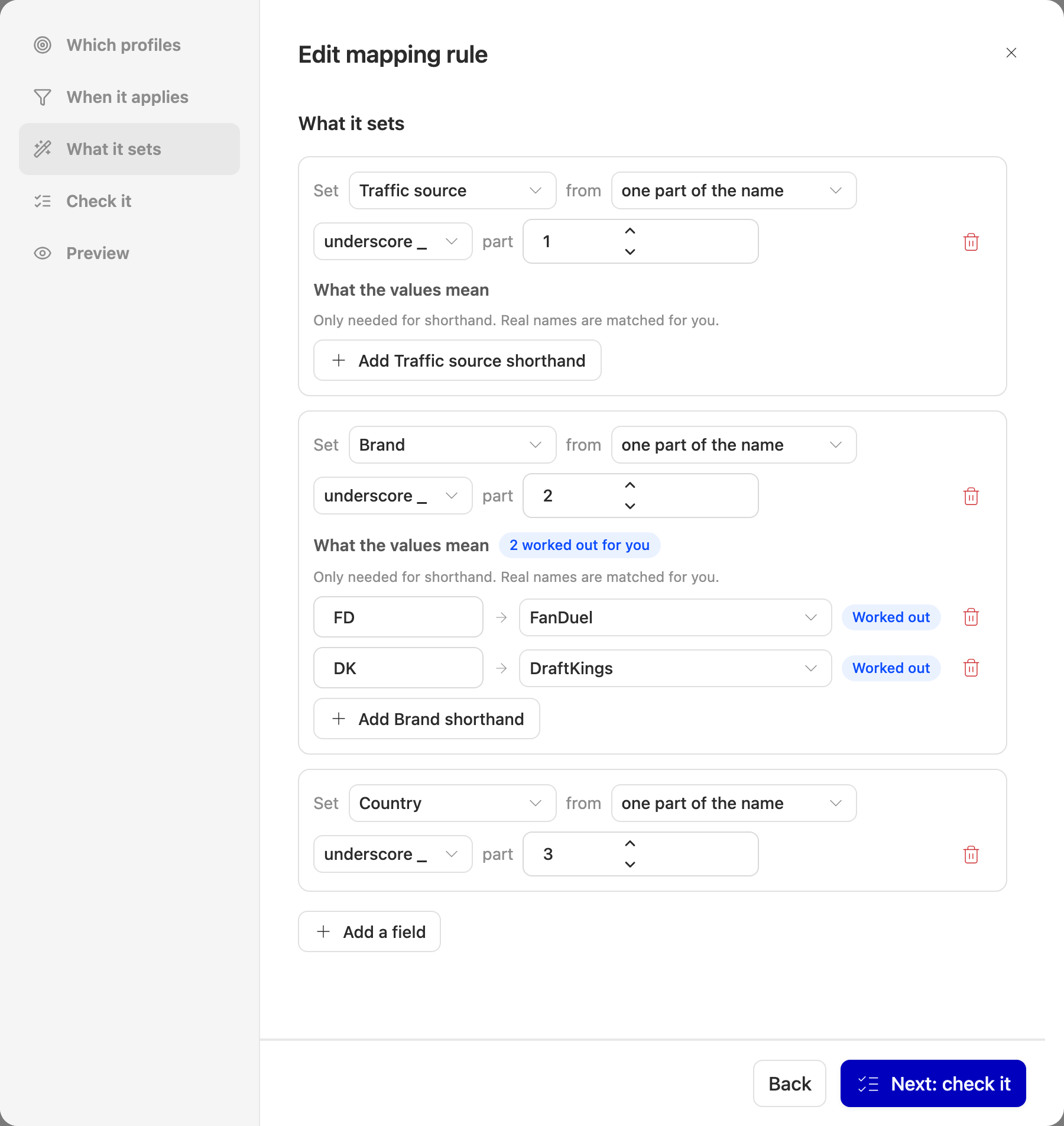
Each row picks a field and says where its value comes from:
- one part of the name — the usual choice, e.g. part 2 of
FB_BTM_DE - the whole name — when the profile name is the brand
- always the same value — a fixed brand or country, chosen from a list
A rule can set each field at most once, and a rule can only ever set these five: brand, traffic source, commission plan, country and region. Nothing else on a tracking profile is rule-writable.
What the values mean
BTM isn't a name any brand actually has — it's your shorthand. The What the
values mean list is where you translate it, and the translation is stored with
the rule, so there's no global dictionary to maintain.
You only need a row for shorthand. Names that are already close enough match on
their own: matching ignores capitals and punctuation, so bet-mgm, Bet MGM
and betmgm all find BetMGM. It goes no further than that, though — nothing
guesses that BTM means BetMGM, so genuine abbreviations always need a row.
Country and region have no list of their own, because they accept either the
code (DE) or the name (Germany).
Rows marked Worked out are ones we figured out from profiles you'd already filled in by hand, and only where the great majority of those profiles agreed. They're usually right, but they're a guess from your data — give them a look before you save.
Check it
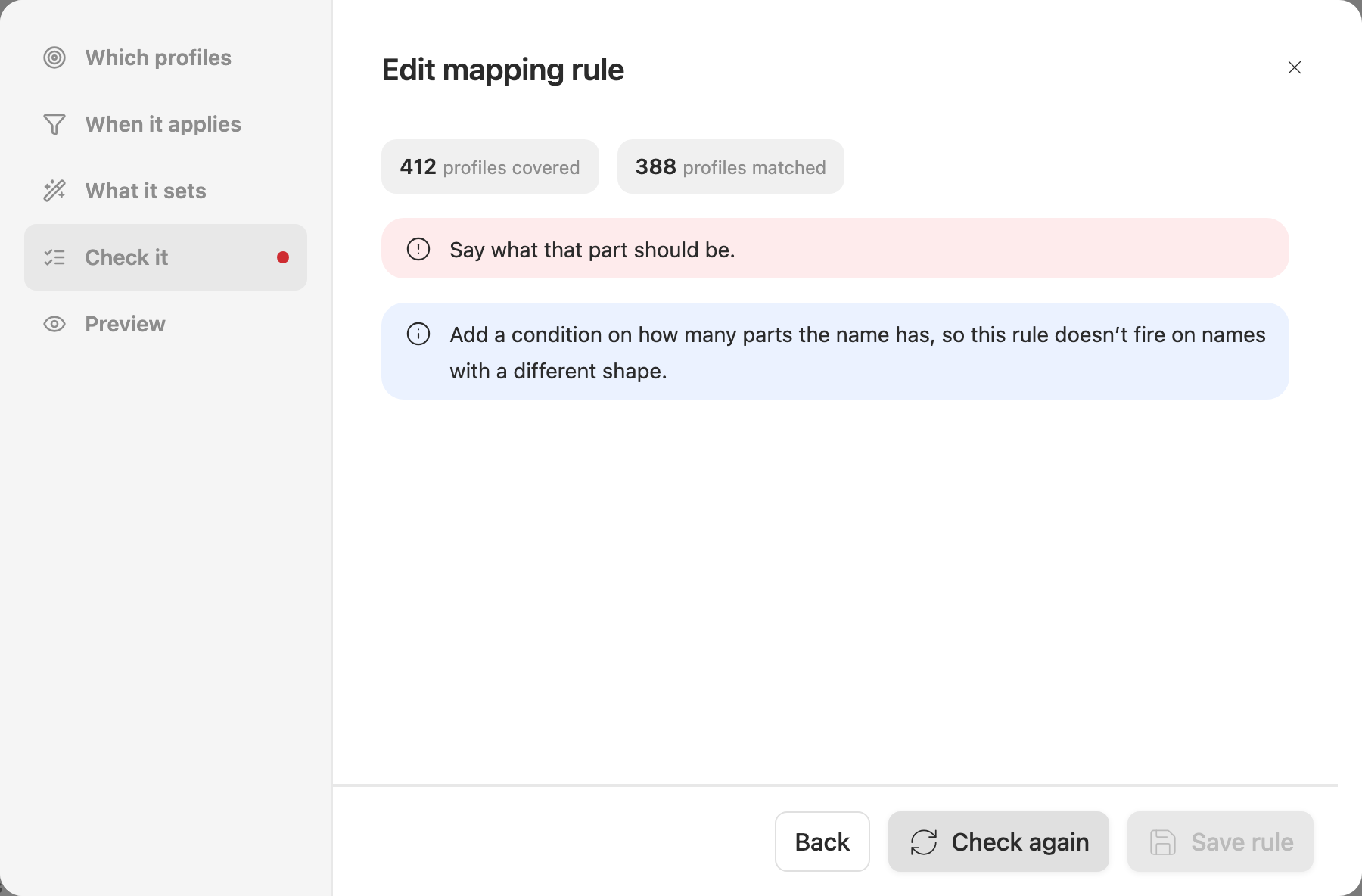
Before saving, we check the rule against every profile it covers — not a sample — and tell you in plain English what we found. The two counts at the top are how many profiles the rule covers and how many it actually matched.
Red messages have to be fixed before you can save. Blue ones are advice: the common one asks you to add a condition on the shape of the name, so the rule can't fire on names it was never meant for.
Preview
Preview is the point of the whole feature: it shows what would happen, without touching anything. Open it for one rule from its row, or for everything at once from Preview all at the top of the page.
Preview all only considers rules that are switched on, so it needs at least one. Previewing a single rule includes it even when it's off — which is how you check a rule, or a suggested draft, before turning it on.
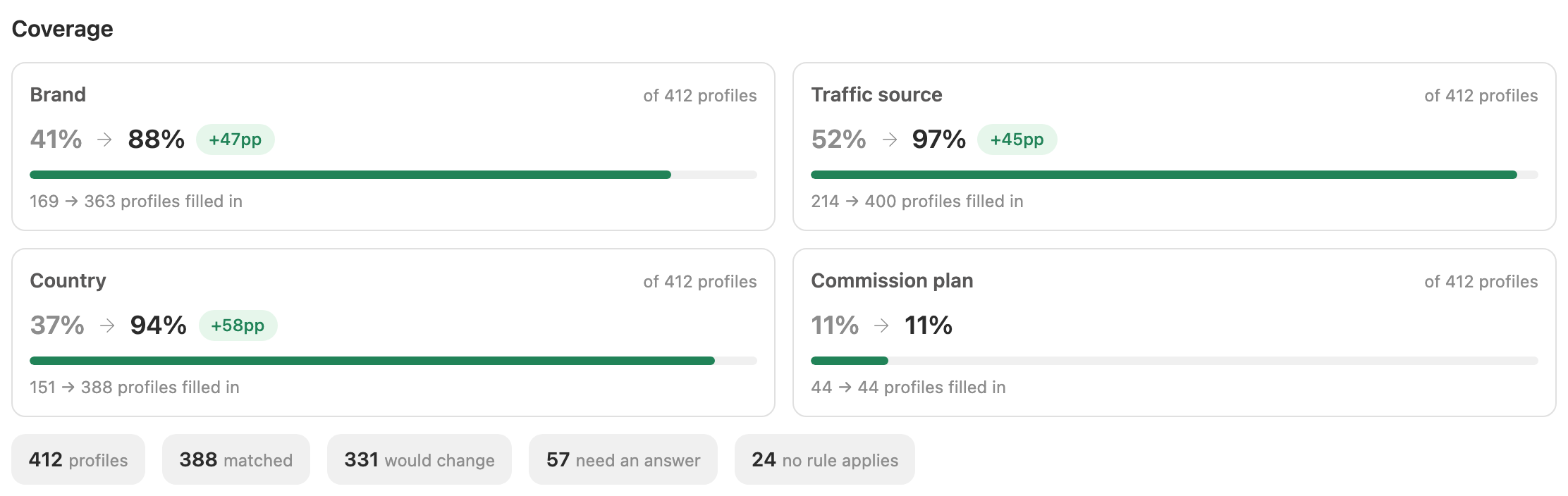
Coverage leads, because it's the number that matters — brand: 41% → 88%. Read it as a fill rate: it counts profiles that have a value, not profiles that have the right value. A rule that corrects a brand somebody set wrongly is doing real work and will still show as no change in coverage.
The counts underneath describe the whole scope, however many rows are listed below them.
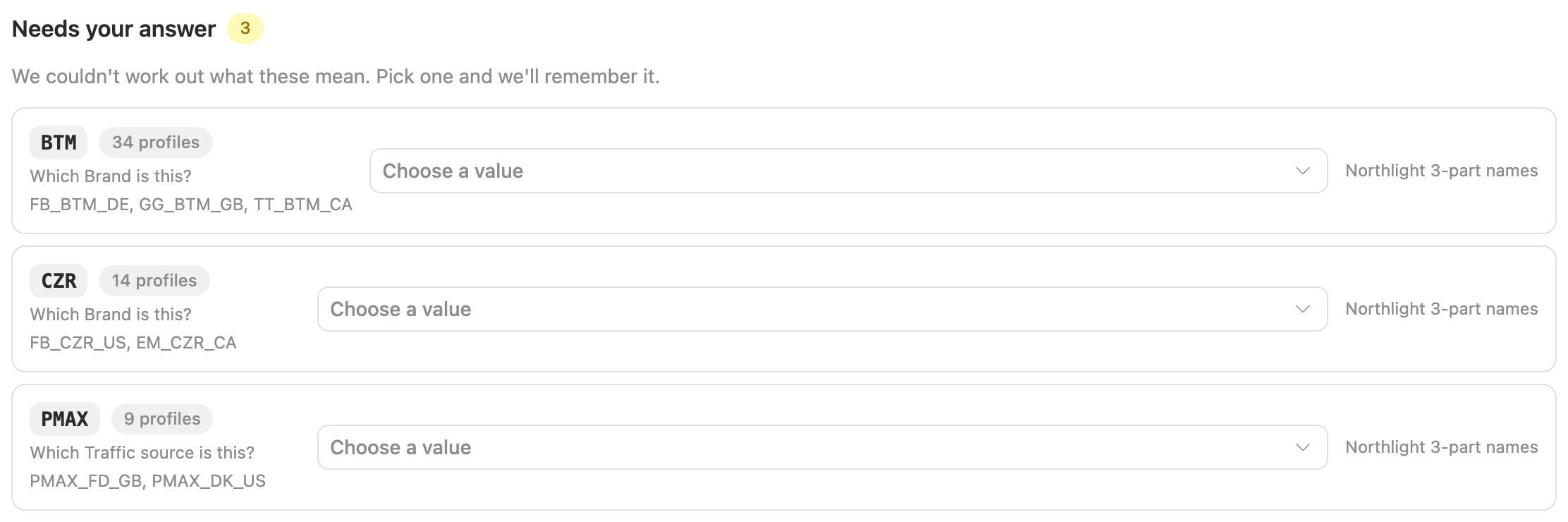
Anything we couldn't work out appears under Needs your answer: a list of
values like BTM, biggest first, each one dropdown away from being fixed.
Answering one saves it onto the rule straight away and re-runs the preview, so
you can watch coverage move.
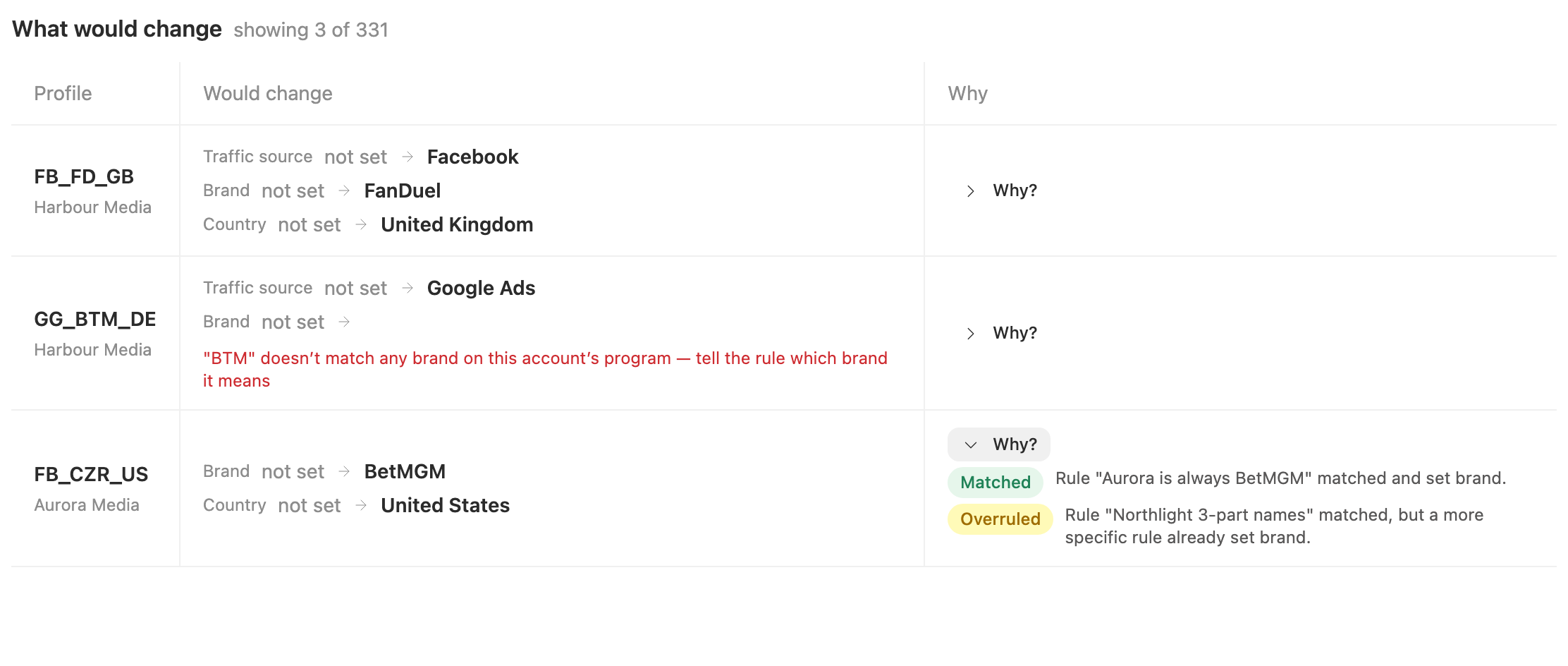
Below that, every profile that would change, with its current value and the proposed one. Why? opens the rule-by-rule story for that profile — Matched, Overruled, Skipped, Stopped — which is where a rule that looks inert explains itself. The list shows the first hundred profiles; the counts above it cover all of them.
Apply

Apply writes what the preview just showed, on exactly the same profiles and rules. It's at the bottom of Preview all, and on the last step of the rule builder for a single rule.
What Apply will and won't do:
- It fills in empty details and replaces values that a rule wrote earlier.
- It never replaces a value a person set. Those are counted as left as you set them, and the run says how many there were. A profile filled in before mapping rules existed counts as set by a person.
- A rule that's switched off is never applied. Turn it on first.
- A profile in New that ends up with a brand, a traffic source and a country moves to Enabled. So don't be alarmed if profiles drop out of a "New" filter after an apply.
Apply runs straight away, and on a lot of profiles it can take a little while. Wait for it to finish: pressing it twice applies twice.
Overwriting your own values
Also overwrite my own values… is a separate button, and it asks you to confirm. It does everything Apply does, and also replaces values people set by hand. The preview can't show those changes: it always assumes your own values are left alone. So more may change than you saw. The run can still be undone from History.
Apply to new profiles automatically
Once a rule does what you want, switch on Apply to new profiles automatically on its first step, then save. From then on, whenever new tracking profiles appear on one of your accounts, that rule fills them in without anyone pressing Apply.
- It's off on every rule until you turn it on, including rules you already had.
- It only fills empty details on the new profiles, and never replaces a value a person set.
- It doesn't go back over profiles you already have. Use Apply for those.
- Precedence still holds. If a narrower rule that isn't automatic covers a detail, the automatic rule leaves that detail alone, exactly as a manual Apply would.
- New profiles are handled in batches, one run per account per batch. Each batch that filled something in shows up in History marked Automatic, and you can undo it like any other run. A batch that filled in nothing leaves no run, so an empty history right after you switch it on can be correct.
- Nothing notifies you when an automatic run happens. History is where to look.
History
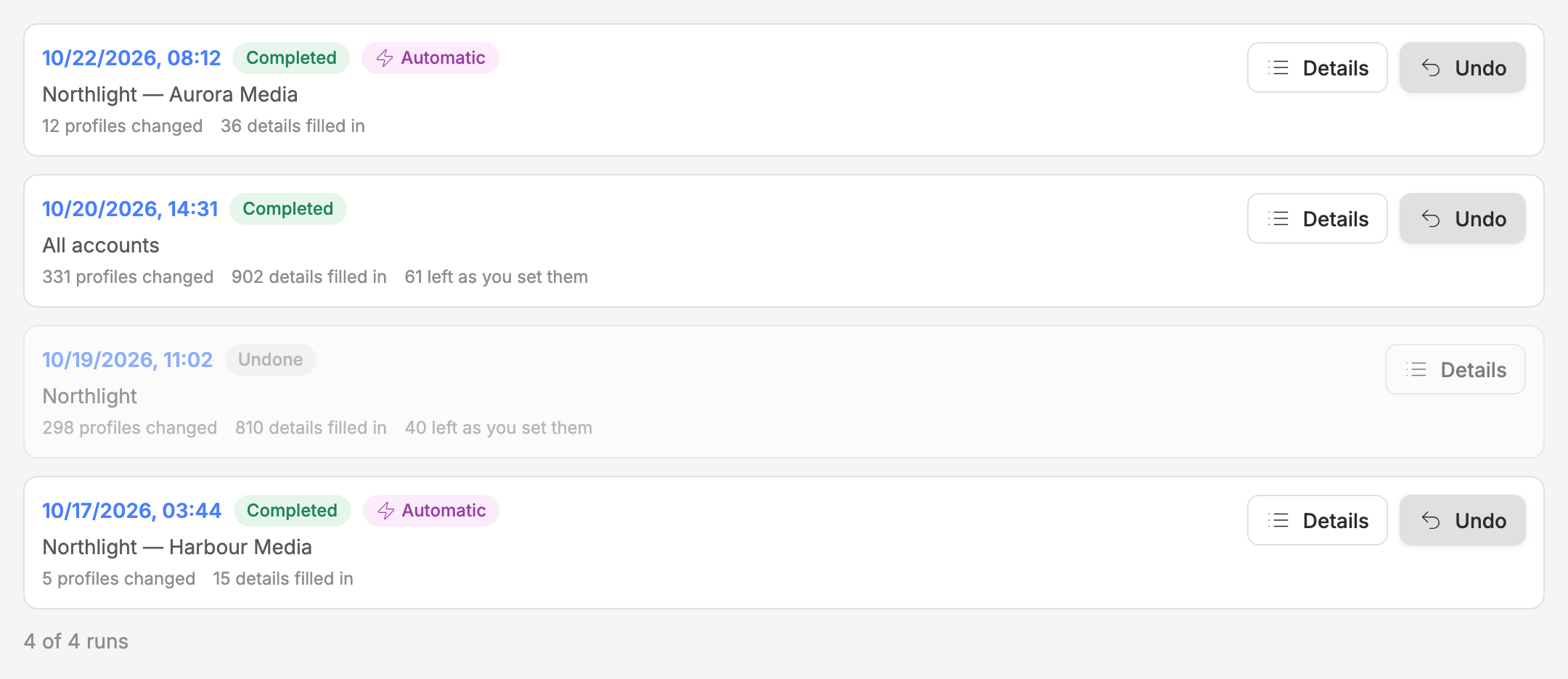
Switch the view at the top of Mapping rules from Rules to History to see every run, newest first: the ones you applied and the automatic ones. Each run shows what it covered and how many profiles and details it changed.
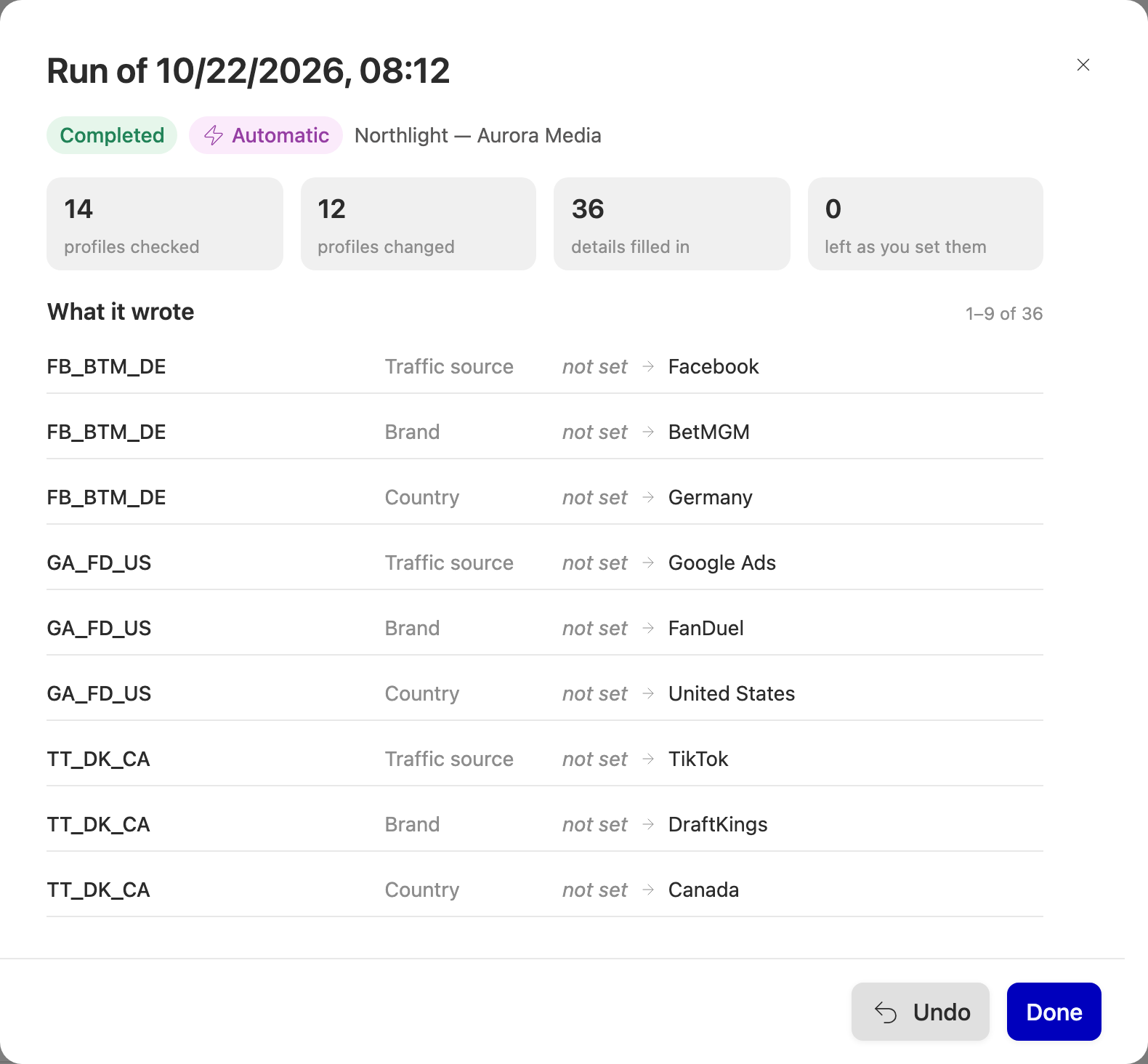
Details opens a run: what it covered, its counts, and every detail it wrote, with the value it replaced. not set means the detail was empty before. There is one row per detail, not per profile, so a profile with three details filled in appears three times.
A run that shows Stopped part-way hit an error before it finished. What it wrote up to that point is still written, and it can be undone.
Undo
Undo puts back the values a run replaced. Details that have been changed since the run are left alone and counted, never forced back. The message you get after an undo says how many there were. That's a success, not a failure.
A run can be undone once. Undo the newest run first: if a newer run covers the same profiles, undoing an older one will mostly be skipped and still use up its one undo, and the confirmation warns you when that's the case. Undo puts the details back but doesn't move a profile back to New. Runs are never deleted, undone or not.
When rules actually run
Only in three ways: when you press Apply, when an automatic rule meets new profiles, and as a dry run when you press Check it, Preview or Preview all. Editing, turning off or deleting a rule doesn't undo what it already wrote. Use Undo in History for that.
Rules only ever fill in the tracking profile record itself. The clicks and conversions Routy has already recorded carry their own traffic source, brand and country, stamped when the click happened, so click reports are not rewritten behind you.
Common questions
My rule shows "matched" but nothing changed. The value was already set, or a narrower rule set it first. Check the Why? column.
An earlier rule couldn't work out a value — does the next rule get a go? No. Once a rule has claimed a field for a profile it keeps it, even if it then fails to translate the value, and later rules are marked Overruled for that field. Answer the value in Needs your answer rather than adding a second rule behind it.
A brand comes back "could mean X or Y". Two of your brands share a name on that program. Answer it once in Needs your answer and the rule will remember which one you meant.
A brand isn't offered, or comes back "not available on this account's program". A profile can only be given a brand that exists on the program that account belongs to, so the same shorthand can resolve on one account and not on another.
Nothing shows for a commission plan. Commission plans belong to a single account, so a fixed commission plan is only offered on a rule scoped to one account. They're matched on the plan's name.
I turned a rule off — is it gone? No. Off rules stay in the list and are skipped. Use Preview on a single rule to check it before turning it back on.
Do archived profiles count? Yes. Preview covers every profile on the accounts in scope, including ones you have archived — so a coverage percentage can be lower than you expect if you have archived a lot of them.
I switched a rule to automatic and History is empty. Either no new profiles have appeared on your accounts since, or the ones that did had nothing for the rule to fill in. Automatic only handles profiles that arrive after you switch it on; use Apply for the ones you already have.
Apply is greyed out. Either the preview shows nothing to change, or you're previewing a single rule that is switched off.
I corrected a profile by hand after an apply. Will the next apply undo my fix? No. A detail you change on the profile counts as set by you from then on, so Apply leaves it alone unless you choose to overwrite your own values.