
Mapping your tracking profiles
A tracking profile is one of the tracking codes your affiliate program reports your results against: a campaign, a tracker or a sub-ID, depending on what the program calls it. Each one tells you where a slice of the account's results came from, but only once you have told Routy what it means. Mapping a profile is saying "this code is my Facebook traffic, for Harbour Bet Casino, in Germany, on this commission plan".
This guide covers one account's profiles. Open Accounts, click the account, and go to the Tracking Profiles tab.
Transcript
In this video, we'll map an account's tracking profiles. A tracking profile is one of the tracking codes your program reports your results against. Open the account, and go to the Tracking Profiles tab. These two arrived with the last run. Routy adds a profile the first time a code reports results. They're named as the program names them, and nothing is mapped yet. Until they are, their results have no traffic source, brand or country. The quickest way is straight from the row. Click a cell, and pick a value. It saves as soon as you choose. There's no Save button. To rename it, and map the rest in one go, click the pencil. System name and value are the program's own. They're how Routy recognises the code, so they can't change. Give it a name you'll recognise. That's the name you'll see in reports. Pick the traffic source this code is used on. Then the country its players come from. Region appears when the country has them. Last, the commission plan. These are this account's plans, with their rates and countries. The plan is used to work out commission as results are collected, from now on.
Click Save.
The profile now reports under its traffic source, brand and country. Traffic source is read from the profile, so its earlier results move too. Commission already worked out stays as it was. And your clicks are never changed. One left to map. When there are dozens that follow a pattern, mapping rules can read the codes for you. The help panel on this screen explains what each field changes.
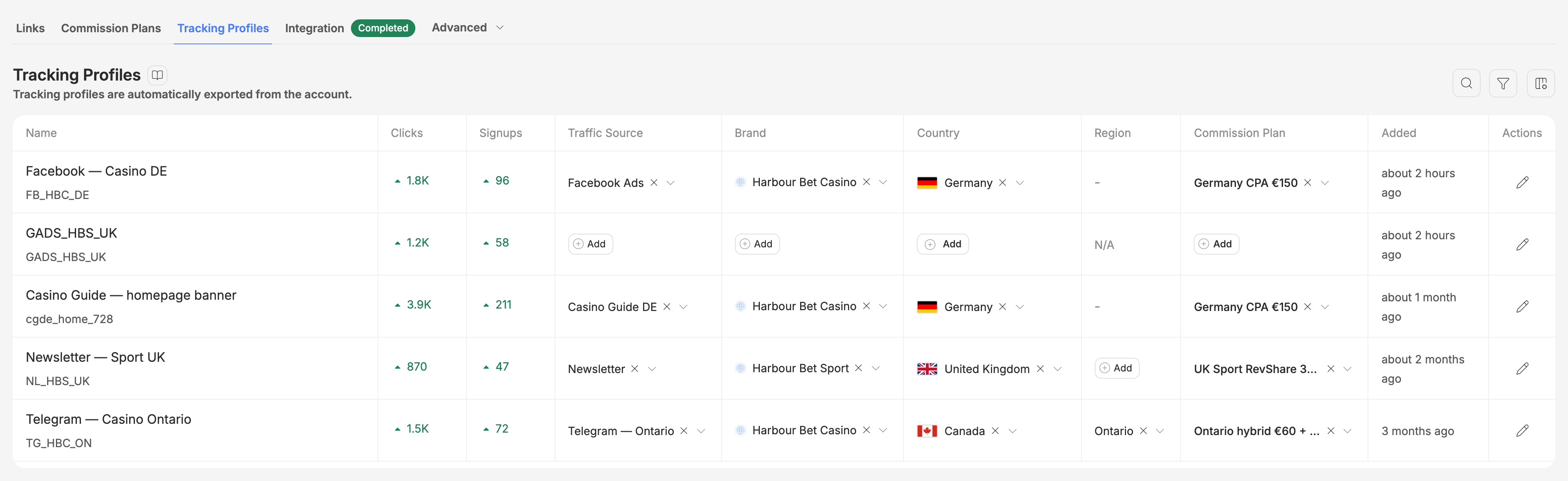
Tracking Profiles
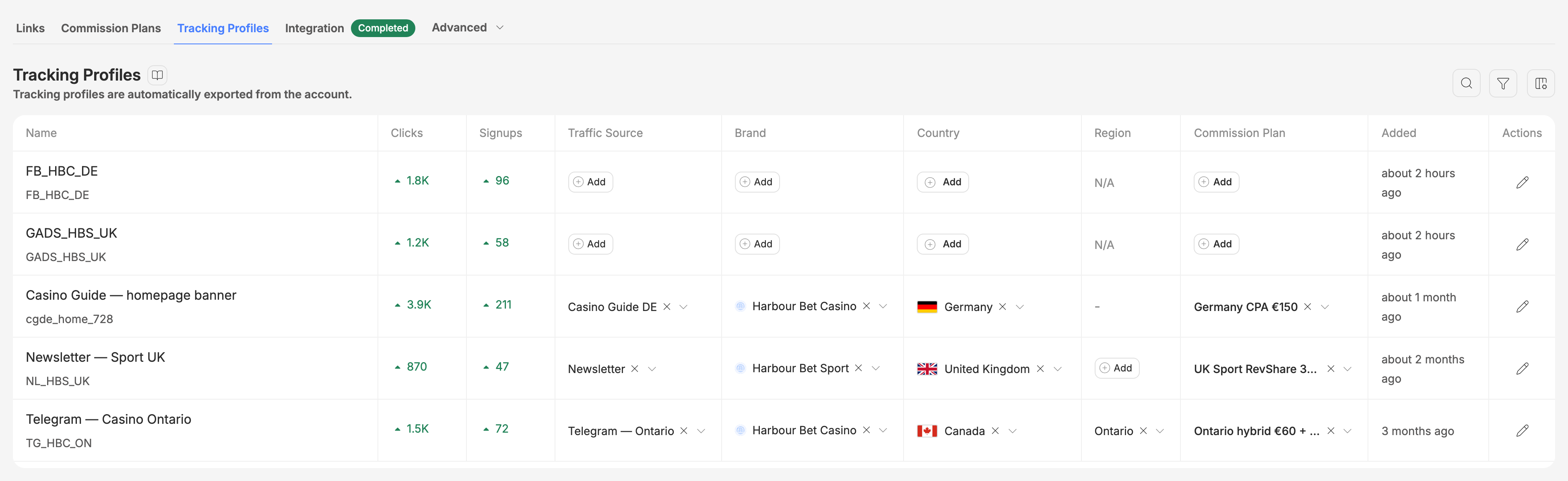
Each row is one profile, and each column after the figures is one thing you can map it to. A cell showing Add has nothing mapped yet.
- Name is the profile's name in Routy, with the program's own name for it underneath.
- Clicks and Signups are the profile's last 30 days, and the arrow compares them with the 30 days before. The column button at the top right adds the other figures the program reports.
- Traffic Source, Brand, Country, Region and Commission Plan are the mapping.
- Added is when the profile first appeared.
Where new profiles come from
You don't create profiles. The first time the account's integration collects a result for a tracking code Routy hasn't seen on this account, it adds a profile for it: named exactly as the program names it, and with nothing mapped. So new profiles turn up after a run, at the top of the list, and every one of them needs mapping.
Two consequences:
- A profile appears only once it has results. Creating a tracking link does not create one. A code that hasn't reported anything yet has no row.
- A code with an unfilled placeholder in it, like
{sub_id}, is skipped. That's a link whose placeholder was never replaced, not a real tracking code, so no profile is made for it.
Map a profile from the table
The quickest way is straight from the row. Click a cell, pick a value, and it saves as soon as you choose. There's no Save button.
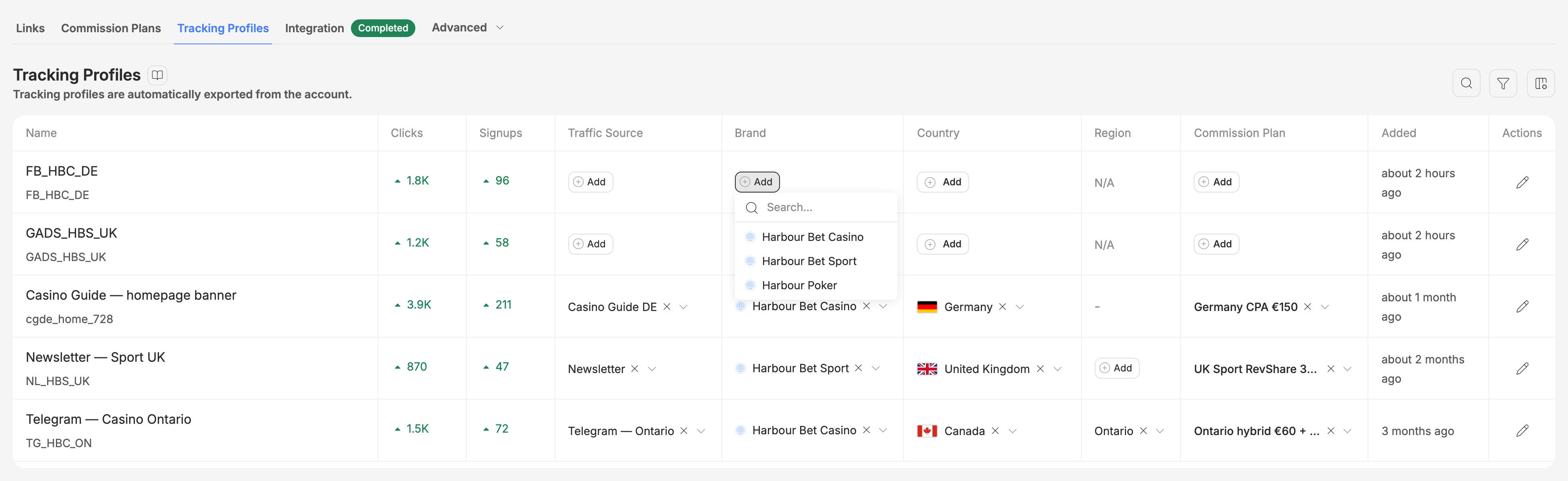
Region only becomes available once the profile has a country that has regions, and it shows – when the country has none. The cross beside a mapped value clears it.
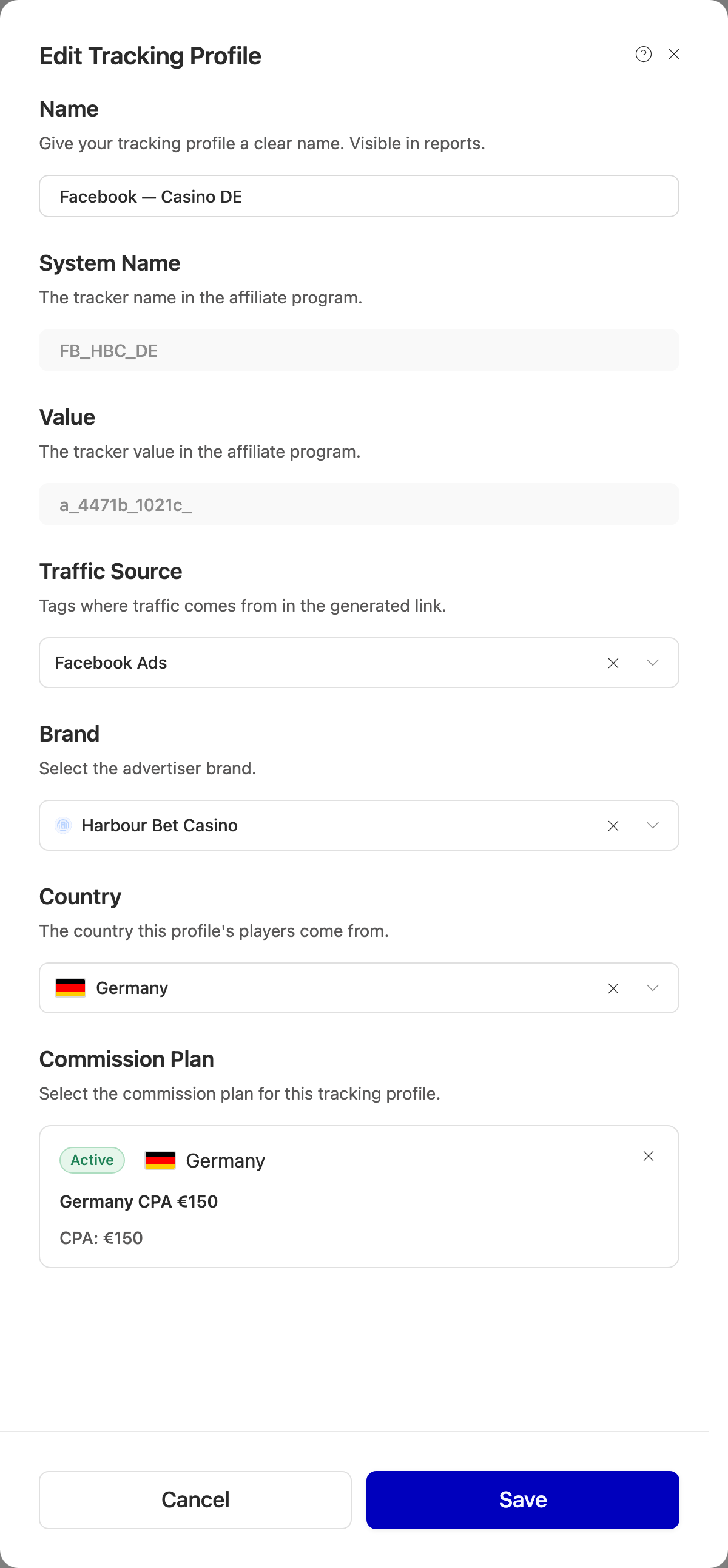
Edit Tracking Profile
The pencil at the end of a row opens the whole profile, which is the place to rename it and map everything at once.
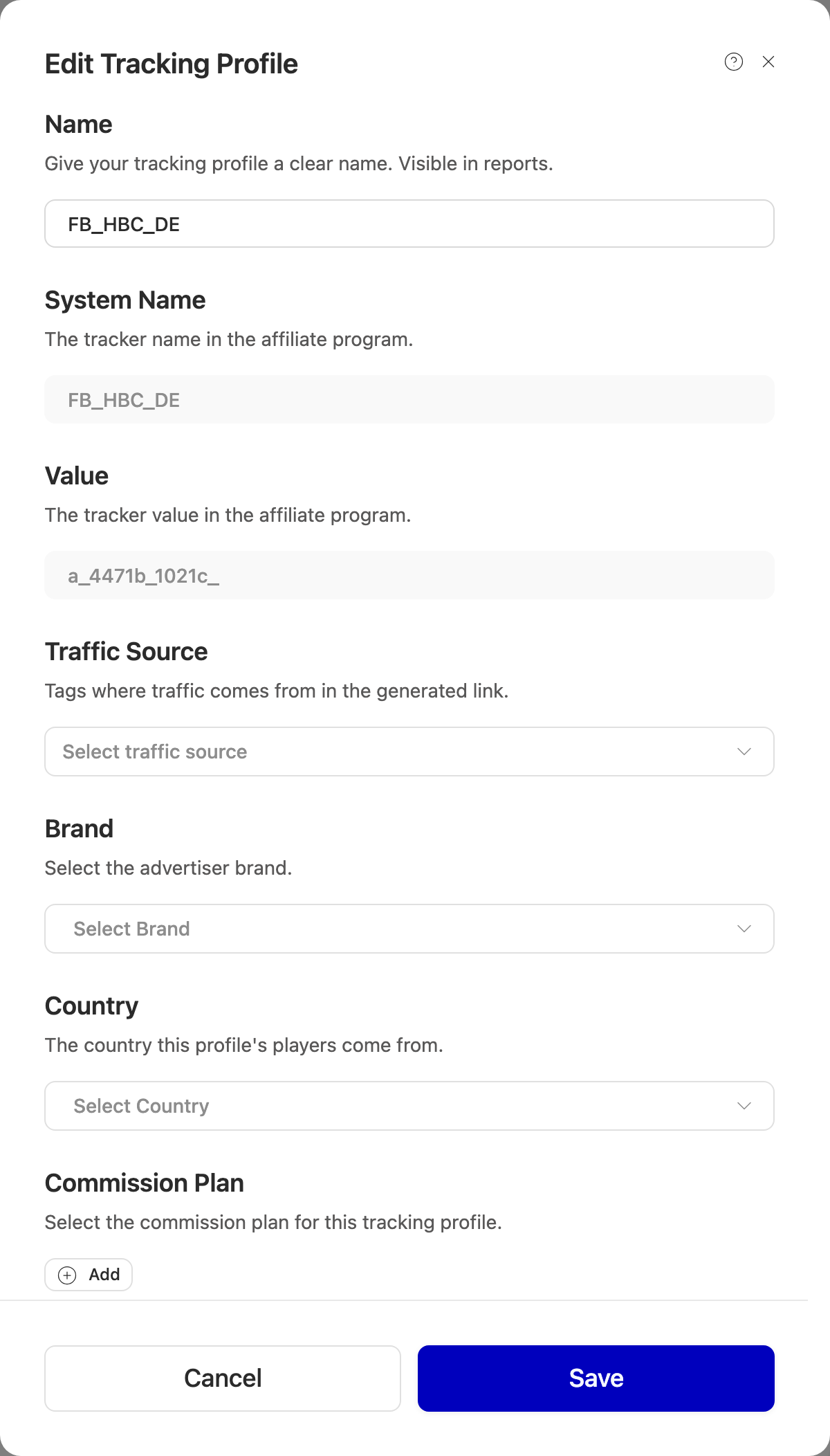
Name
The name you see in Routy's tables and reports. A new profile is named after the
program's tracking code, which is usually something like FB_HBC_DE. Give it a
name you'll recognise.
If the program later renames the code and you have never renamed the profile, its name follows the program's. Once you rename it, your name stays.
System Name and Value
These are the program's own name for the tracking code and the code itself. They are how Routy recognises the profile in every report it collects, so you can't change them. Search on the tab finds a profile by either of them, as well as by its name.
Traffic Source
Where this profile's traffic comes from. The list is your traffic sources. One that isn't enabled is still listed, greyed out, but you can't choose it.
Brand
The advertiser brand this profile sends players to. The list is every brand on this account's program.
Country and Region
The country this profile's players come from, and optionally a region within it.
Commission Plan
Click Add to pick one of the account's commission plans. Each shows its rates and the countries it covers.
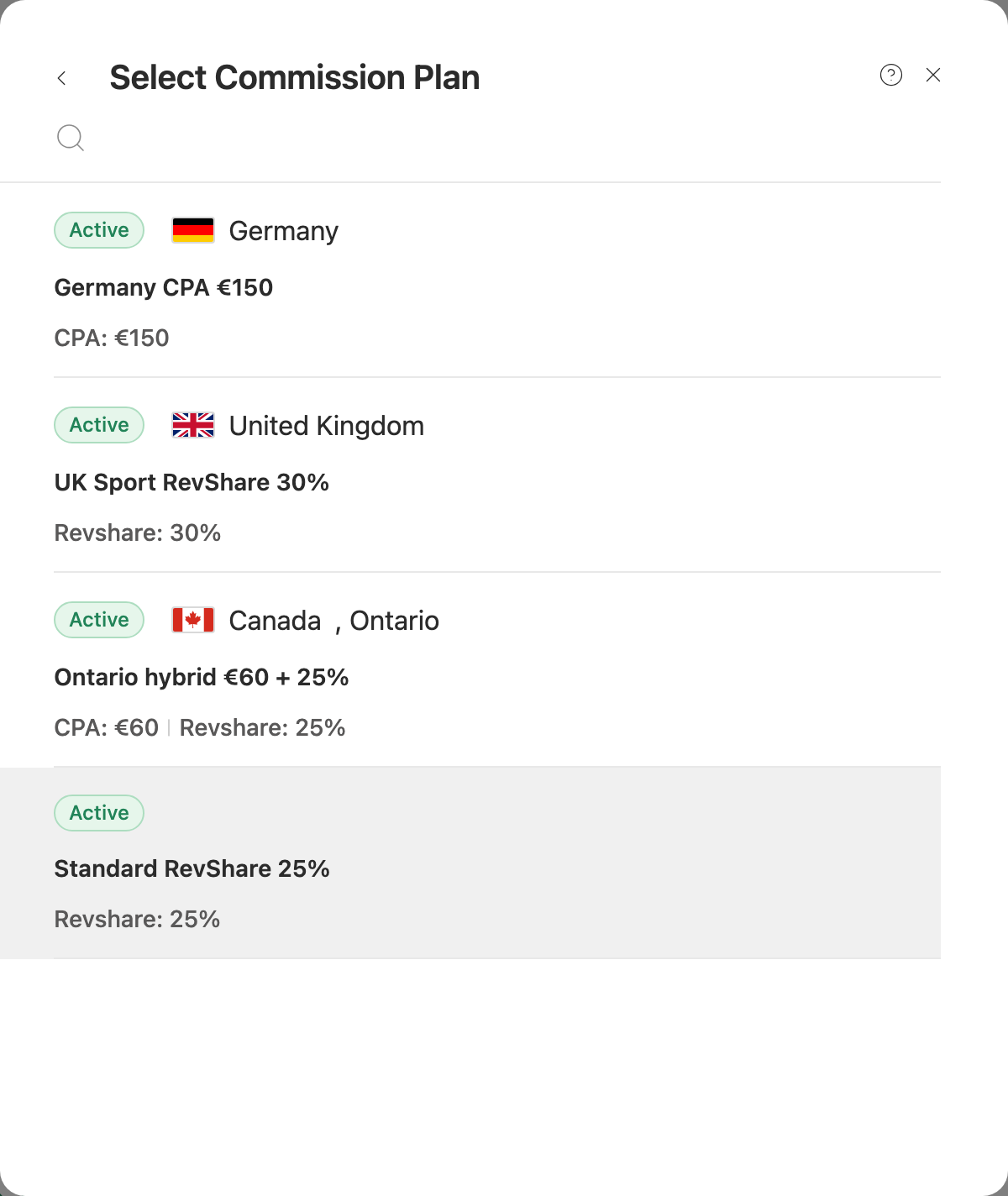
The list is this account's plans only. To add or change a plan, use the account's Commission Plans tab first.
Click Save when you're done. Nothing in the drawer is saved until you do.
What mapping changes
Mapping changes how this account's collected results are reported. It doesn't reach back into anything else, and the parts take effect differently:
Your clicks are not affected. A click records its traffic source at the moment it happens, from the link that was clicked, so click reports never change when you map a profile.
Which commission plan wins
A profile's plan is one of several that can apply to the same result. Routy uses the first of these that is set and Active:
- a plan set on the tracking link the result came through
- a plan on that link's tracking profile
- the plan on this profile
- a plan for the result's region, then its country
- the account's default plan
So a profile without a plan isn't left without commission. It falls through to the plans below it.
Mapping many at once
When an integration brings in dozens of profiles whose codes follow a pattern, mapping rules read the codes for you. The Mapping rules button on this tab shows the rules that reach this account, or starts a new rule that covers just this account. A rule switched to apply automatically also fills in profiles as they're added here.
A value you set by hand always wins over a rule, and rules leave it alone. One detail matters here: saving the Edit drawer counts all five mapping fields as set by hand, including any you left empty. If you want a rule to fill a field later, change single fields from the table instead, which claims only the field you changed.
Common questions
A tracking code I use isn't in the list. It hasn't reported any results yet. A profile is added the first time a collected report names it. Check the Integration tab to see that the account's latest run completed.
Some profiles have disappeared. Archived profiles are hidden from the list. See archive and cleanup.
I changed a profile's commission plan, but past commission didn't change. That's expected. Commission is worked out when results are collected, using the plan in place then. Collecting the same dates again doesn't redo it either, because dates that already have data are skipped.
My traffic source report changed for last month. A profile was re-mapped. Traffic source is read from the profile's current mapping, including for results already collected.
The traffic source I want is greyed out. It isn't enabled. Enable it under Traffic Sources to use it here.
The brand I want isn't offered. The list holds the brands Routy has for this account's program. If the program has a brand that's missing, contact support to have it added.
When to contact support
- Two profiles have the same Value.
- You need commission recalculated for dates already collected, after a plan change.
- A profile you never archived has gone, or a run completed and a code with results still has no profile.