Routy

Postback Tracking

This article shows you:

  • What is Postback Tracking?

  • Benefits of Postback Tracking

  • Setting Up Postback Tracking with Routy

Generate a postback link for the brand on Routy

  • Setting the postback link on the brand's platform

  • Testing the postback

  • Data coming from Postback Tracking

  • Troubleshooting

The affiliate program is not available in Routy - what should I do?

  • When I press Post Back in the account section I receive an error - what's wrong?

  • The test with the affiliate program is failing

  • The postbacks are not showing on Routy - what should I do?

What is Postback Tracking?

Postback Tracking, also called server-to-server tracking, is a method of tracking used to receive conversions. It is an alternative method of extracting conversions from an affiliate program. This method of tracking involves using the brand (entity you are promoting) server sending an event back once a conversion has happened. It is NOT to be confused with pixel tracking, which is a different method of tracking page engagement.

Below are some key terms when dealing with postback tracking:

- Postback link - Link generated by Routy to be provided to the affiliate program that will send a notification to Routy that an event (e.g. signup, FTD)

- Affiliate link - The link on the affiliate traffic source that the player clicks on

- Click Parameter - This is variable the program uses to differentiate between each click (e.g. var1). Every affiliate program software has its own click ID parameter. For example:

Cellxpert: afp

  • MyAffiliates: payload

  • IncomeAccess: c

Ā 

  • When a player clicks on a link, a unique click parameter (for e.g: afp, payload, c) will be appended to the affiliate link by Routy

  • The program captures the click id value

  • The player lands on the brand page, and goes through the user journey

  • Once a defined conversion (typically signup and/or FTD) happens, the postback URL sends an event back to Routy containing the click id value, informing Routy of the event

Note: Routy passes click IDs in two ways:

- Click ID: A string of 32 characters containing letters and numbers e.g. 54379c59-90d4-4d49-d91f-94b358c153d1

- Dynamic Variable: A string of 8-16 characters starting with 2-3 letters followed by numbers e.g. ABC123456, I7MKY8BTZZ2TIU7R9K

Benefits of Postback Tracking

Affiliates use postback tracking for multiple reasons, namely:

  • To get conversions in real time

  • To have a log of events

  • To get conversions at a click level from a brand

Ā 

Setting up Postback Tracking with Routy

To set up postback tracking, you must follow the following steps:

  • Generate a postback link for the brand on Routy

  • Setting the postback link on the affiliate program

  • Testing the postback

To generate a postback link for the brand on Routy, there are two ways you can do this:

  • Account-Specific Postback Link (recommended)

  • Generic Postback Link

The advantage of setting an account-specific postback link is the click parameter will always match the parameter that Routy is passing for that account. We recommend using this method to generate a postback.

Ā 

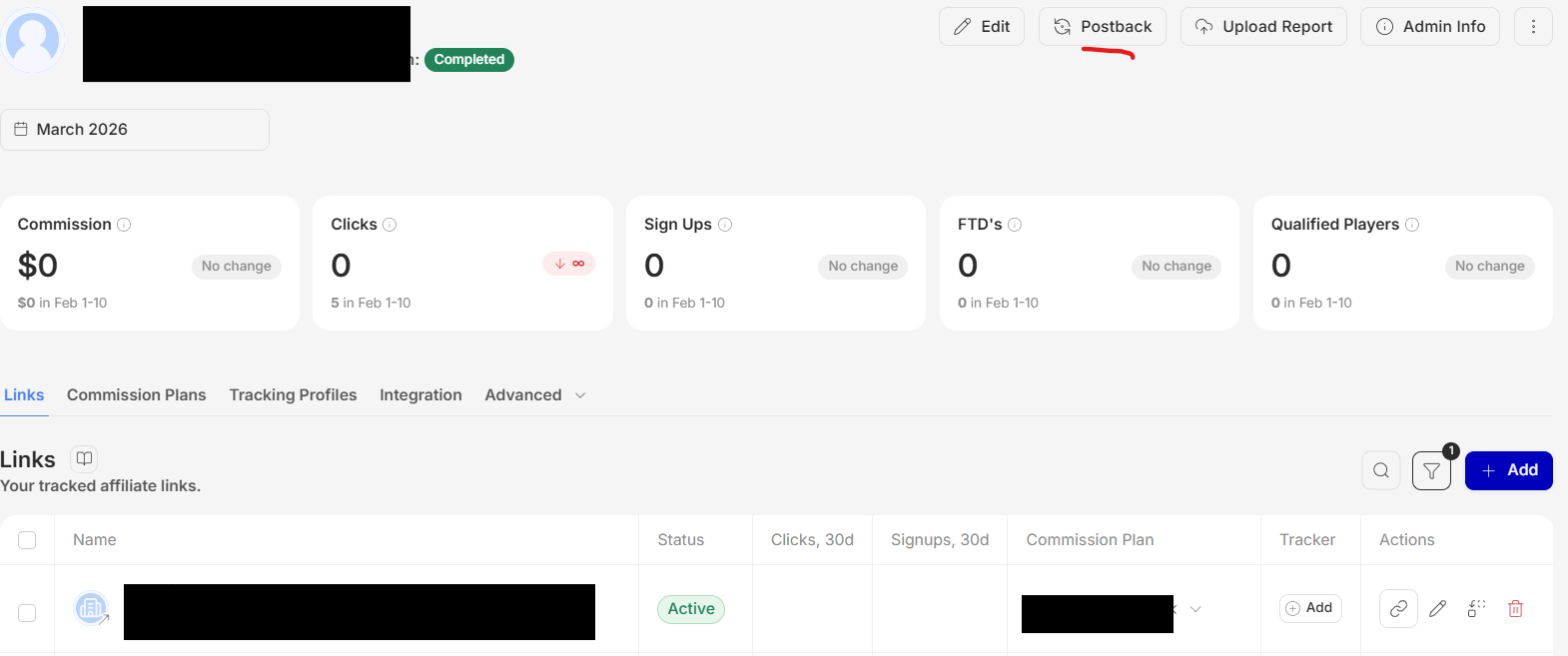
  1. To set up a Postback URL in Routy for a specific account, select the account for which you want to set up the postback and select Actions > Postback

Note: if you are unable to generate a postback or receive an error, please go to the Troubleshooting section of this article

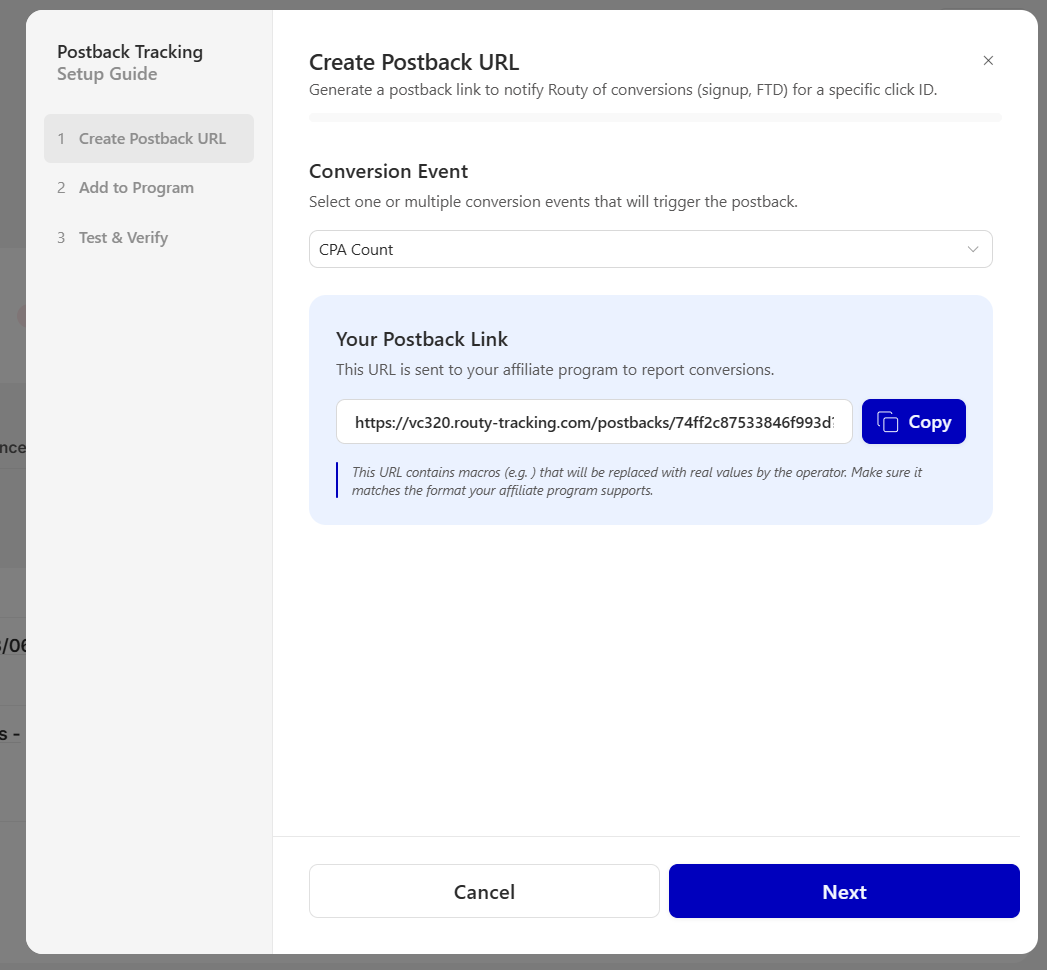
  1. Routy will request you to select the Conversion Type for the postback to be generated

  1. When a Conversion Type is selected, the postback will be generated and can be inputted on the affiliate program or to the account manager

Note: In the example above:

  • clickId is the Routy click id parameter

  • click_id is the affiliate program parameter

Ā 

This method should ONLY be used if you're

  • Experienced with setting up postback tracking

  • You understand the difference between a dynamic variable and a click ID on Routy

  • You know what click parameter the program uses for click level tracking

Ā 

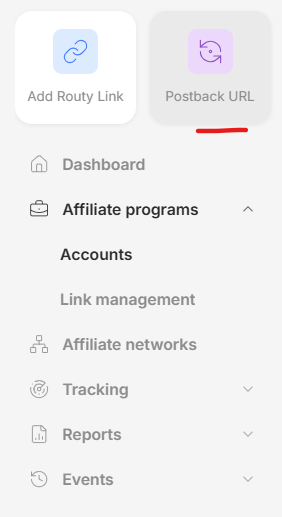
  1. Press the Quick Actions button and press Postback URL

  2. Routy will request you to select the Conversion Type for the postback to be generated

  1. When a Conversion Type is selected, the postback will be generated and this postback MUST be amended by the user to match the requirements of the partner.

Tip: The variable in the curly brackets MUST be edited to match the requirements of the partner

Ā 

Ā 

Once you have confirmed that you are passing the correct parameter and have the postback with this parameter, it is time to set the postback link on the affiliate program. Typically you will need to set up one postback per event (e.g. one for registration and one for FTD)

You can find how to set postbacks on specific affiliate program softwares in our documentation.

Ā 

3. Testing the postback

Once providing the postback link to the account manager or the brand platform, you may be asked to do a test.

Steps

  1. Find the account in the Accounts page

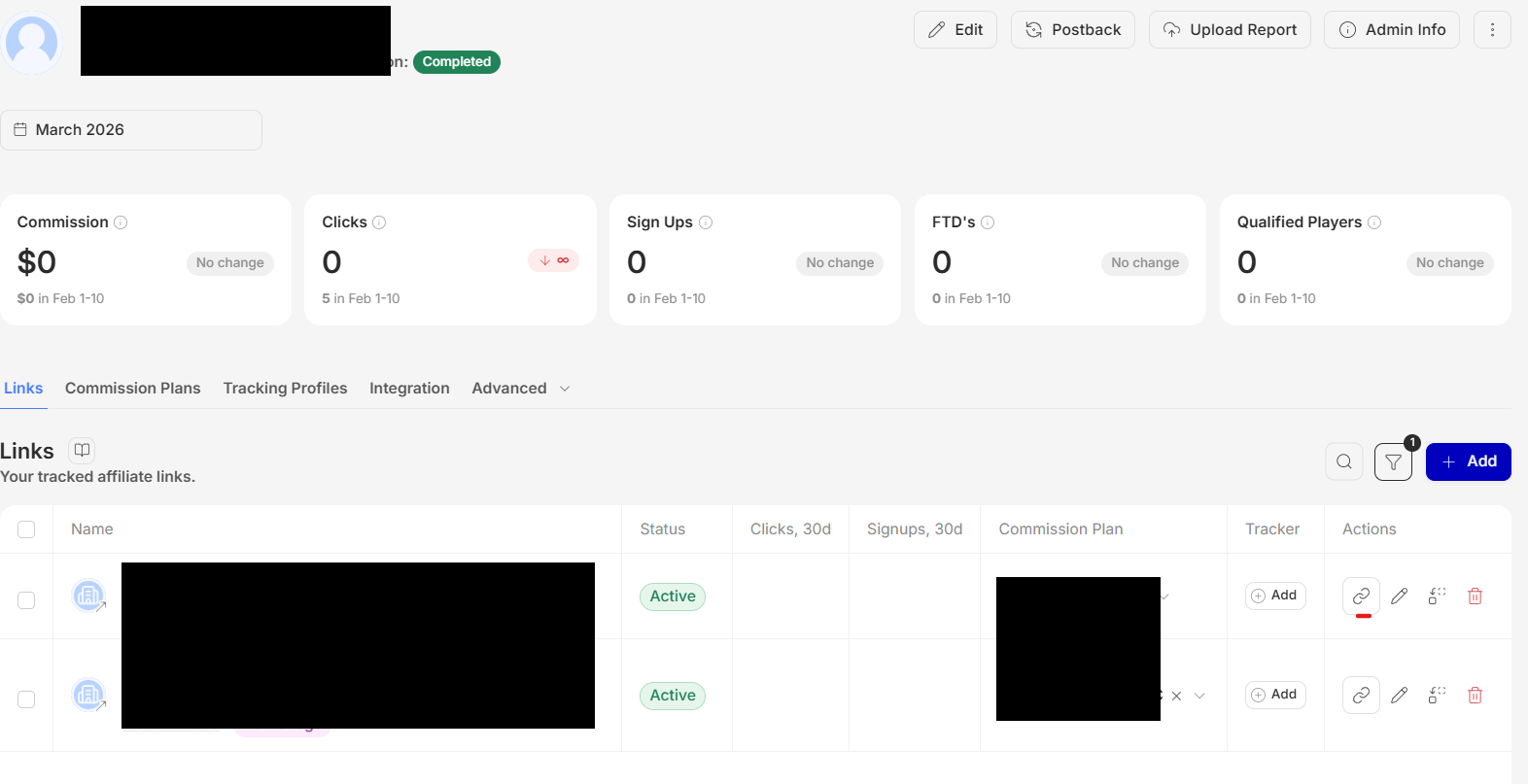
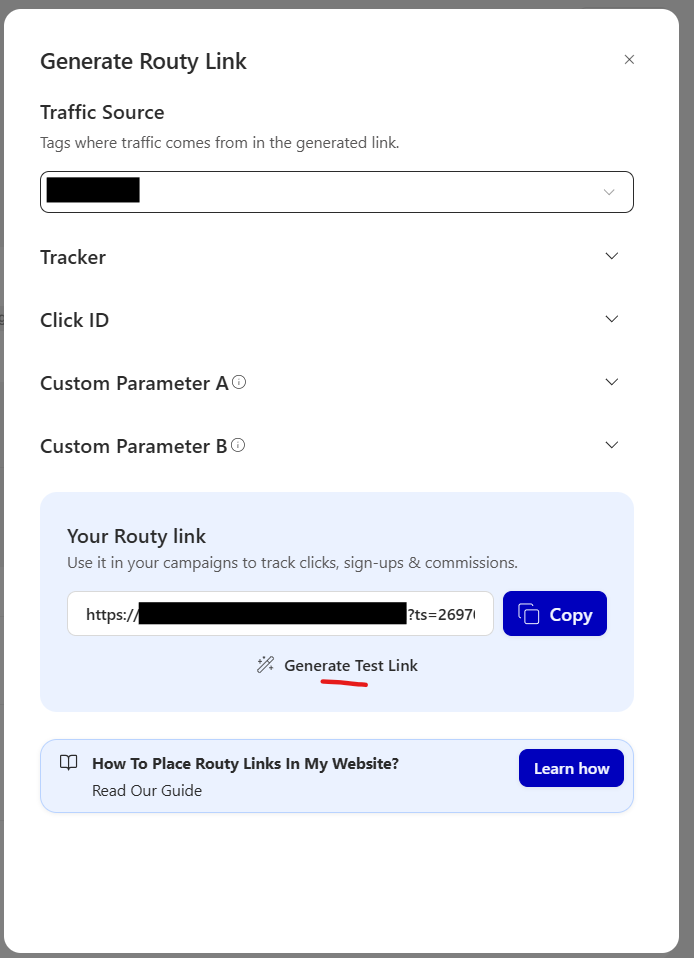
  2. Choose the tracking link to test by pressing the chain button and select a traffic source to generate a Routy link (it usually looks something like this: https://affiliates.routy.app/route/12345?affId=54321&ts=1234567)

  3. Copy the URL and add &testlink=1 at the end and press Enter (i.e. https://affiliates.routy.app/route/12345?affId=12345&ts=1234567&testlink=1)

  4. A URL should show up in the browser, copy this and provide it to your account manager as a test affiliate link

  5. To check if the test worked, check the postback log found under Reports > Logs > Postbacks

Data coming from postbacks

All incoming postbacks will be funneled into other reports, and may take up to an hour to show in your dashboards.

To see the events coming from postbacks can be seen in real time in the postback logs. These are found under Reports > Logs > Postbacks

If you cannot find this report please set up a ticket here for the Routy team to enable them.

Ā 

Troubleshooting

The affiliate program is not available in Routy - what should I do?

If the affiliate program is not available in Routy, kindly set up a ticket here.

Ā 

When I press Post Back in the account section I receive an error - what's wrong?

** **

If you receive the above message when trying to get the postback link it means that the program has not been configured for postback tracking. In this case, you will need to set a tracking parameter, as explained below.

1. Find the click parameter of the affiliate program

Almost every affiliate program has a specific click parameter. To find this click parameter, request it from your account manager. The click parameter is a variable name that is used to differentiate between each click.

2. Set Routy to pass the click parameter

To set the click parameter, you can set the parameter via the Tracking Parameters option on the account menu.

IMPORTANT: When setting tracking parameters please be sure to set the correct parameters. If set incorrectly they could result in lost traffic.

Ā 

Note that if you have just updated the tracking parameters of an account, it will take Routy 30 minutes to begin passing this parameter.

To ensure that the right parameter is passing, at the end of your generated Routy link add ā€œ&testlink=1ā€ to see the URL a player will land on

Ā 

E.g. https://affiliates.routy.app/route/12345?affId=54321&ts=123456&testlink=1

  • If you see the click parameter of the brand being appended to the target URL, it means that traffic is passing correctly

Ā 

The test with the affiliate program is failing

The affiliate program test will ONLY work if the click ID or dynamic variable (&dyn=) are in **the correct format **explained above.

This means that the click ID or dynamic variable value in the postback tested should look something like this:

If the affiliate program sends the postback exactly as you have added it, for example:

- https://hooks.routy.app/post-back/1234abcd567efgh890ijkl?clickId={visit_id}&signups=1Ā 

It will **fail **(try it - press on the URL).

The postbacks are not showing on Routy - what should I do?

If the postbacks are not being received it could be due to a few different reasons. Below are a few checks to find why this is happening

  • Ensure the correct parameter is being passed on the affiliate link Add &testlink=1 to the affiliate link to view the URL the player lands on and the parameters being passed

  • If you are running a test with the brand, this most likely means that the variable {click_id} is not being replaced in the platform

In this case, press on the Routy link and do a test signup. If everything is working correctly, you should see a signup appear on Ā 

  • If this still doesn't work inform your account manager

If the postbacks are still not being received, kindly set up a ticket here.